Writing my own detection rule
Wazuh's built-in rules flagged my /etc/passwd path traversal as a generic level-6 web attack. Writing a custom rule to make it scream instead taught me the difference between running a SIEM and doing detection engineering.
Every up to here used Wazuh’s default built in rules. Some attacks wouldn’t be caught at all. That’s fine for learning what the tool does, but it’s not the only skill I actually want. I want to be able to decide what’s worth alerting on. So for this piece, I wrote my own rule. It’s small, but it required the most time out of all the detections I tried before this.
The gap I wanted to close
When I did the web-attack detection, my path-traversal attempt against /vulnerabilities/fi/?page=../../../../etc/passwd got flagged, but only as a generic “web attack returned code 200.” Level 6. The same alert I’d get for someone poking at a search box.
But that request isn’t generic. /etc/passwd is the system’s list of user accounts. Someone reaching for it through a web app is trying to read files they should never touch. It wouldn’t make sense to have that be so generic looking, I wanted it to really alert that something was wrong.
The rule
Custom rules live on the manager, in local_rules.xml, and Wazuh reserves the ID range 100000 to 120000 for your own. Here’s what I wrote:
<group name="local,web,attack,">
  <rule id="100020" level="12">
    <if_sid>31100</if_sid>
    <url>etc/passwd</url>
    <description>Critical web request attempting to read /etc/passwd (path traversal to system password file)</description>
    <mitre>
      <id>T1083</id>
    </mitre>
  </rule>
</group>
level="12" is critical. The generic alert was a 6. I’m saying this is six levels more serious, and I have to justify that to myself.
<if_sid>31100</if_sid> is Wazuh’s base rule for a web-server access log. By saying if_sid, I’m telling my rule to only run after Wazuh has already recognized and parsed the log. This is all so I can have one more judgement.
<url>etc/passwd</url> is the actual condition. If the parsed URL contains etc/passwd, it will fire the detection.
<mitre> uses the same ATT&CK tagging the built-in rules use (T1083, File and Directory Discovery), so my rule shows up in the same reports as everything else.
Testing it without waiting for an attack
The thing I didn’t expect to love: wazuh-logtest. Run it, paste a single raw log line, and it tells you exactly which rules fire and why. So I could test my rule against a made-up log line instantly, instead of launching the attack and refreshing a dashboard hoping:
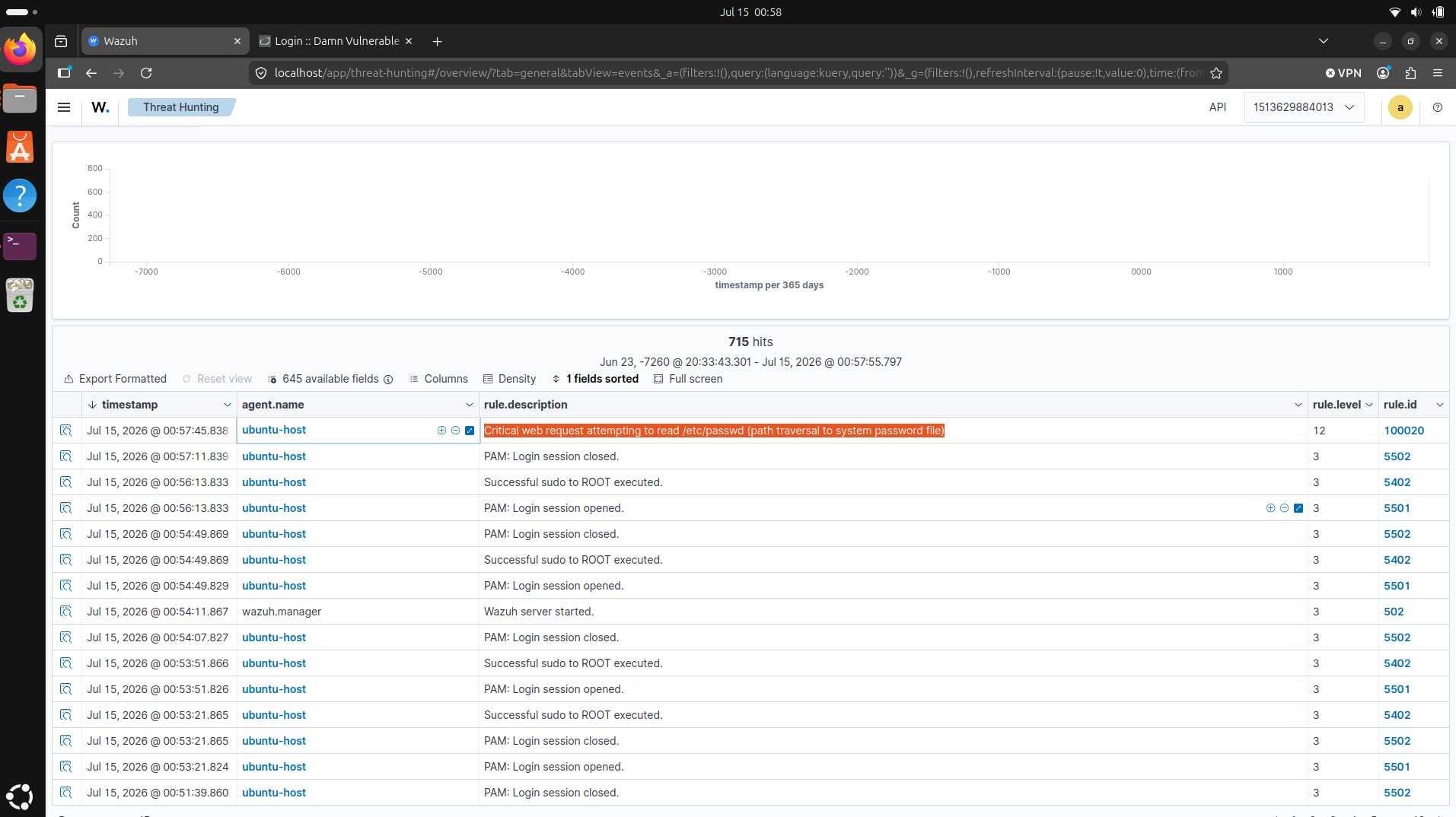
127.0.0.1 - - [14/Jul/2026:10:00:00 +0000] "GET /?file=../../../../etc/passwd HTTP/1.1" 200 512 "-" "curl/8.0"It came back with Rule id: '100020', Level: 12, my description. That feedback loop, write, test a line, adjust, is how the rule actually got right. Then I ran the real request against DVWA’s file-inclusion page and watched 100020 fire live in the dashboard at level 12, exactly where the generic level-6 alert used to be.
What I took away
A SIEM out of the box gives you a huge pile of general detections. My dream isn’t to just admire them, I want to know my own environment well enough to be able to know what I want to detect and what I want to do when it detects this. It’s a small rule and it only covers a single file, but this is something that flipped how I saw this whole thing. Learning how to expand the rules really taught me a lot.
Limits
My rule is deliberately narrow: it matches the literal string etc/passwd. An attacker who URL-encodes the path, or targets a different sensitive file, won’t flag it. A production version would cover more files and more evasions, and I’d tune the severity against how often it false-positives. But I wanted to test out how it worked first which was the point for a first rule. I’d rather ship one rule I fully understand than ten I copied.