Attempt, 200. I just want to fix it already.
Throwing SQLi, XSS, and path traversal at DVWA and watching every single one collapse into the same Wazuh alert, and what that taught me about what a log-based SIEM can and can't actually see.
For the third detection, I wanted something that looked like real SOC work. Watching web traffic for injection attempts. So I researched and found DVWA, a web app that’s intentionally full of vulnerabilities. I threw common attacks at it, and had Wazuh read the web server’s log. The attacks themselves weren’t hard to look up and find, however, what I actually learned was how the attacks were logged down in Wazuh.
The setup
DVWA runs in a Docker container. The issue wasn’t attacking it, but getting the logs to Wazuh. My agent runs on the host, but the web server’s log lives inside the container, so I had to bridge the two:
docker run -d --name dvwa -p 8080:80 -v /opt/dvwa-logs:/var/log/apache2 vulnerables/web-dvwaThe -v part mounts the container’s Apache log folder onto a folder on my host, so the agent can read it. Then I pointed the agent at that file by adding a block to its config:
<localfile>
  <log_format>apache</log_format>
  <location>/opt/dvwa-logs/access.log</location>
</localfile>
The part that cost me time
access.log didn’t exist. I kept checking /opt/dvwa-logs/ and it was empty, and for a while I thought Apache wasn’t even running. I was wrong, the problem was that mounting an empty host folder over the container’s log directory meant that the log had nowhere to appear until the container was recreated cleanly and actually served a request. Once I rebuilt it and tried attacks, it finally showed up.
This taught me that it’s not always just about the rules or how well you fine-tune your security. If the foundation, in this case, logging, was not working properly, your security might work but in the long run, in reality it wouldn’t.
The attacks
Three classics against three DVWA modules, once I had a logged-in session cookie:
# SQL injection (UNION-based)
curl "http://localhost:8080/vulnerabilities/sqli/?id=1'+UNION+SELECT+user,password+FROM+users--+-&Submit=Submit"

# Reflected XSS
curl "http://localhost:8080/vulnerabilities/xss_r/?name=<script>alert(1)</script>"

# Local file inclusion / path traversal
curl "http://localhost:8080/vulnerabilities/fi/?page=../../../../etc/passwd"
Each one left its fingerprint in the access log: UNION+SELECT for the injection, the <script> tag for the XSS, ../../../../etc/passwd for the traversal. That’s exactly what Wazuh matches on.
What fired, and the thing that confused me
I expected separate rules for the SQL injection and the XSS. But every attack came back as 31106. At first I thought it wasn’t detecting the attacks or something was broken.
I was wrong. 31106 is “a web attack returned code 200 (success).” It’s a rule built on top of the attack rules (31103 for SQLi, 31105 for XSS, and so on), it fired because one of those attacks matched its definition. Earlier, I made the mistake of making a working session cookie so these attacks always got through.
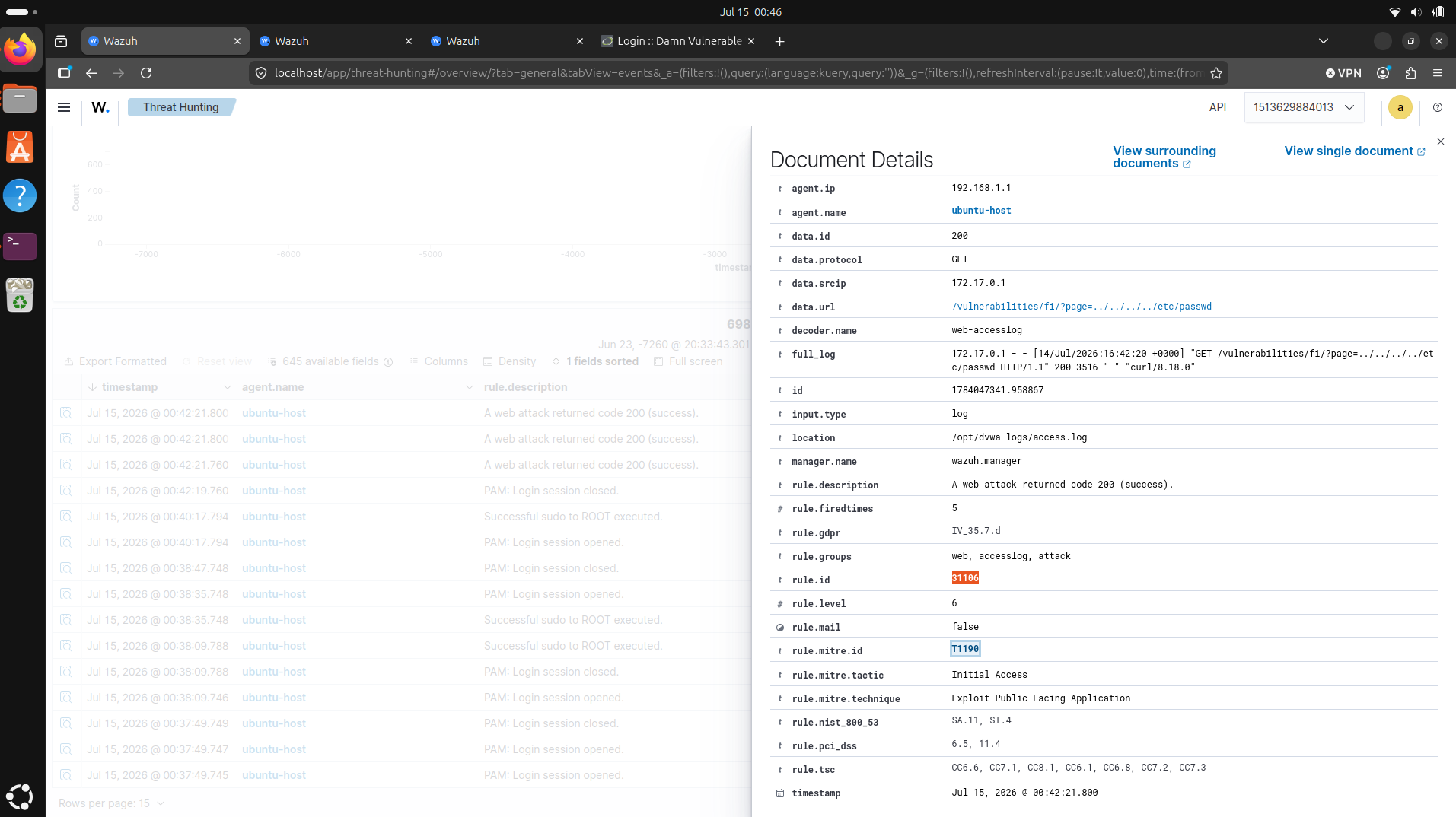
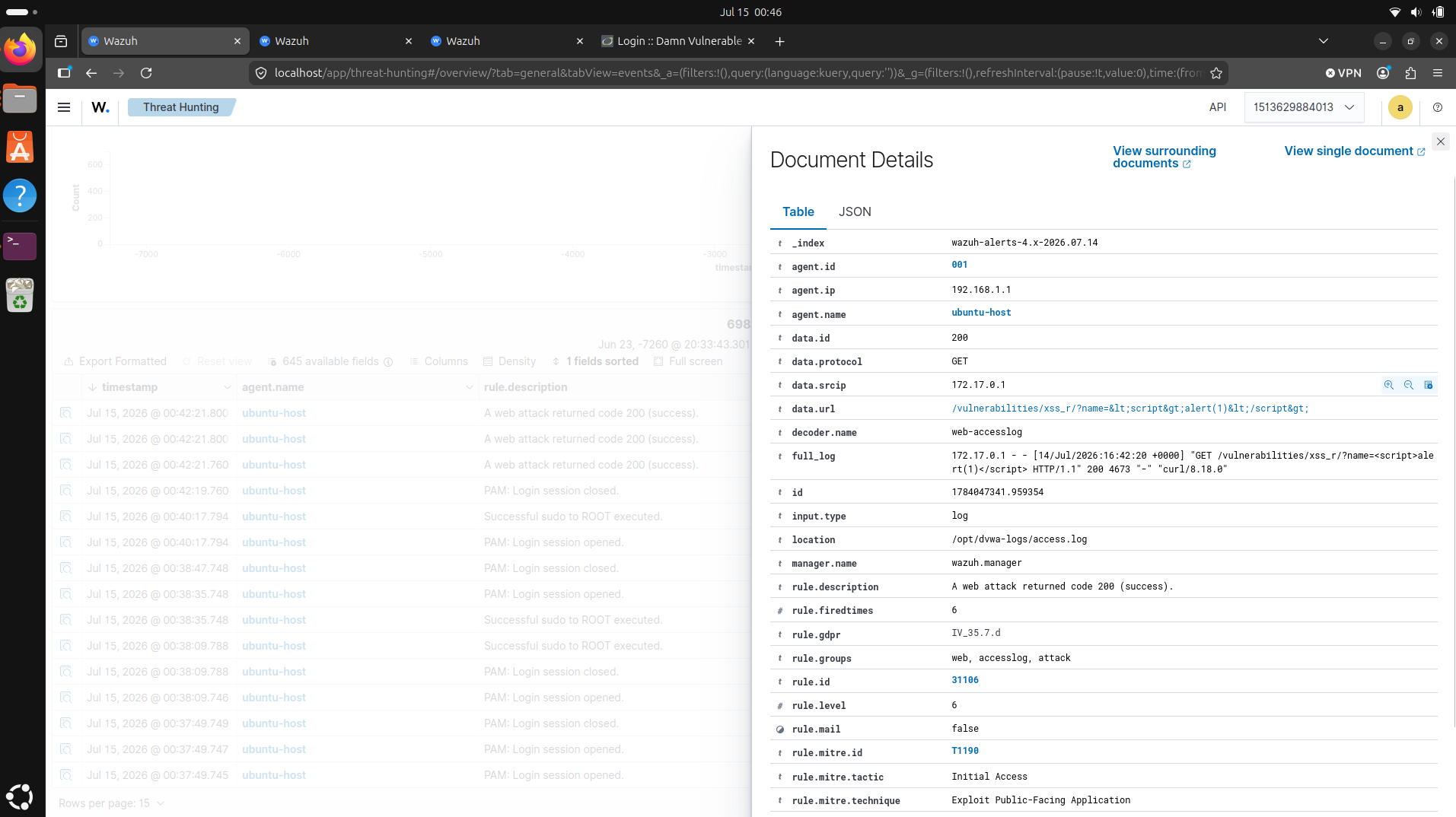
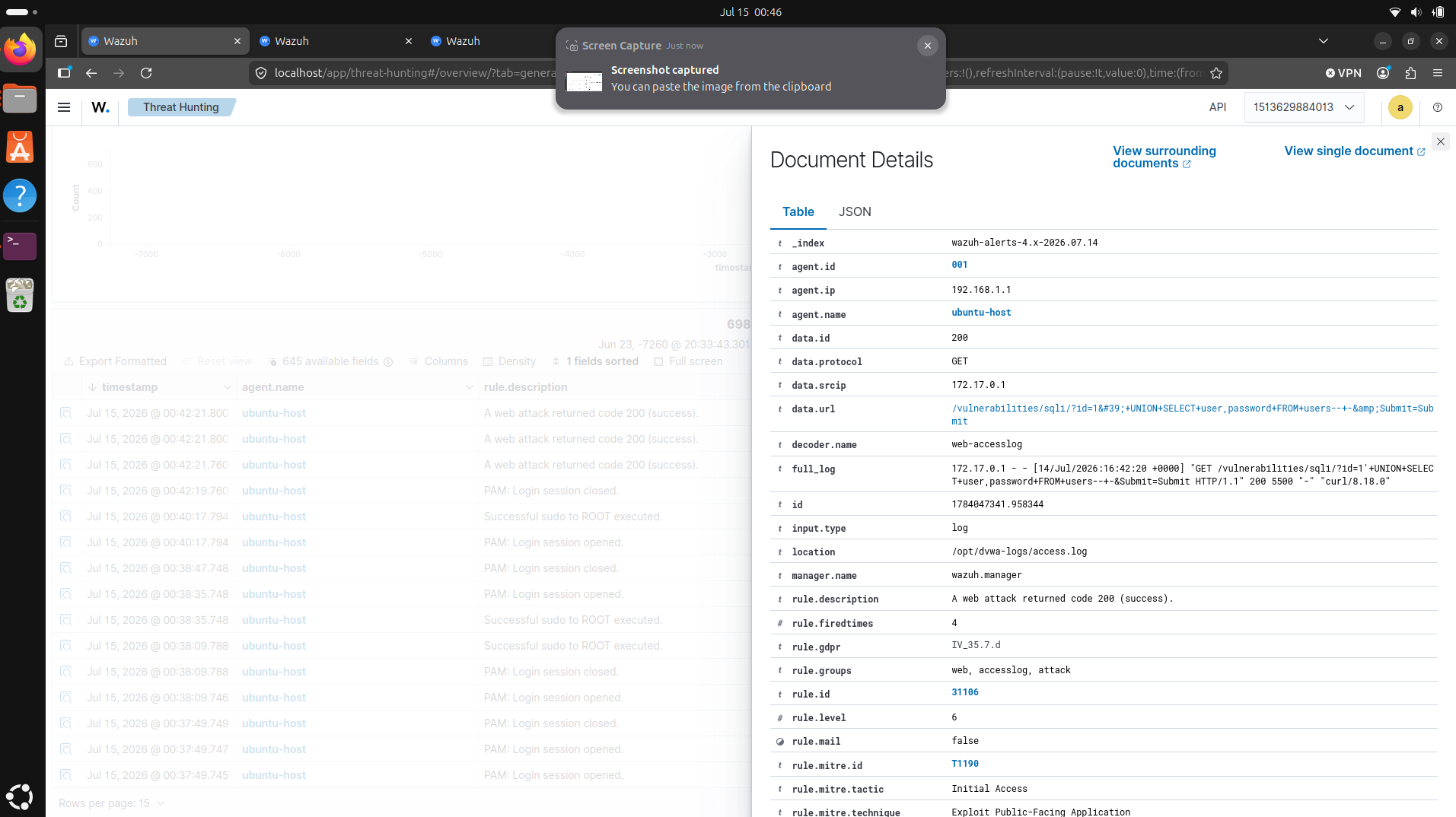
All three carry MITRE T1190, Exploit Public-Facing Application, at level 6.
The part that clicked
A 200 does not mean the attack worked, it’s Wazuh reading a text log. It sees the request and it sees the response code. That’s all it has. It knows the SQL injection was sent and that the server returned a normal page. It has no idea whether the injection actually dumped a table.
That one alert quietly hid multiple different claims. There’s the attempt, a malicious pattern in the request. There’s 200, meaning the server processed it without having an error. And there’s actual compromise, meaning the attack actually got through. I found out Wazuh cannot see all this alone from a log.
A 200 is a stronger signal than a 404, and worth escalating. But it’s an inference, not proof. If I were triaging this for real, “31106” would move me to go look, check the app, the database, the response body, not to declare a breach immediately.
What I took away
I had initially thought that the job was “get the alert to fire.” The real job was reading what the alert can or can’t know. A log-based SIEM sees requests and status codes, not the consequences. You will need to manually check whether the attack was attempted or actually went through by hand.
Limits
This detection is pure pattern-matching on a log. It catches attacks that look like attacks in the URL, and it would miss an injection cleverly encoded to dodge the signatures. It could also false-positive on a legitimate request that happens to contain a word like select or ../. As covered, it can flag a 200 but never confirm a real compromise. For learning how web attacks show up in logs, that’s plenty. For trusting it in production, every one of those gaps is a project of its own.
DVWA ran locally against localhost:8080, a DVWA container on my own machine.