Batman?!
Splunk's BOTSv1 dataset handed me 33 million events and asked who defaced Wayne Enterprises' website. I chased Po1s0n1vy through Joomla logs, got the defacement mechanism wrong twice, and found proof of a stolen admin login hiding in a session cookie instead of the login event itself.
BOTSv1 is Splunk’s own training dataset, built by their security team so you can practice being the defender in a simulated breach. You get 33 million logs of Windows, Sysmon, firewall, and web traffic, and a question set. You have to find out what happened, in this case, a breach. Just a SIEM, a timeline, and seventeen questions.

This post covers Scenario 1, a group called Po1s0n1vy defacing imreallynotbatman.com, one of Wayne Enterprises’ web properties. Part 2 covers Scenario 2, a Cerber ransomware outbreak on a different host.
Getting the environment running
I installed Splunk Enterprise 10.4.1 locally, a trial license on Ubuntu with a Ryzen 5800H and 16GB RAM, and loaded Splunk’s pre-indexed BOTSv1 dataset as a self-contained app.
Once the data was in, I installed seven add-ons for field extraction. Fortinet Fortigate, Tenable, Splunk App for Stream, Microsoft Windows, Microsoft Sysmon, URL Toolbox, and a CCX add-on for Suricata (the original TA-Suricata from 2016 has since been pulled from Splunkbase, so I substituted a current CIM-compliant one).
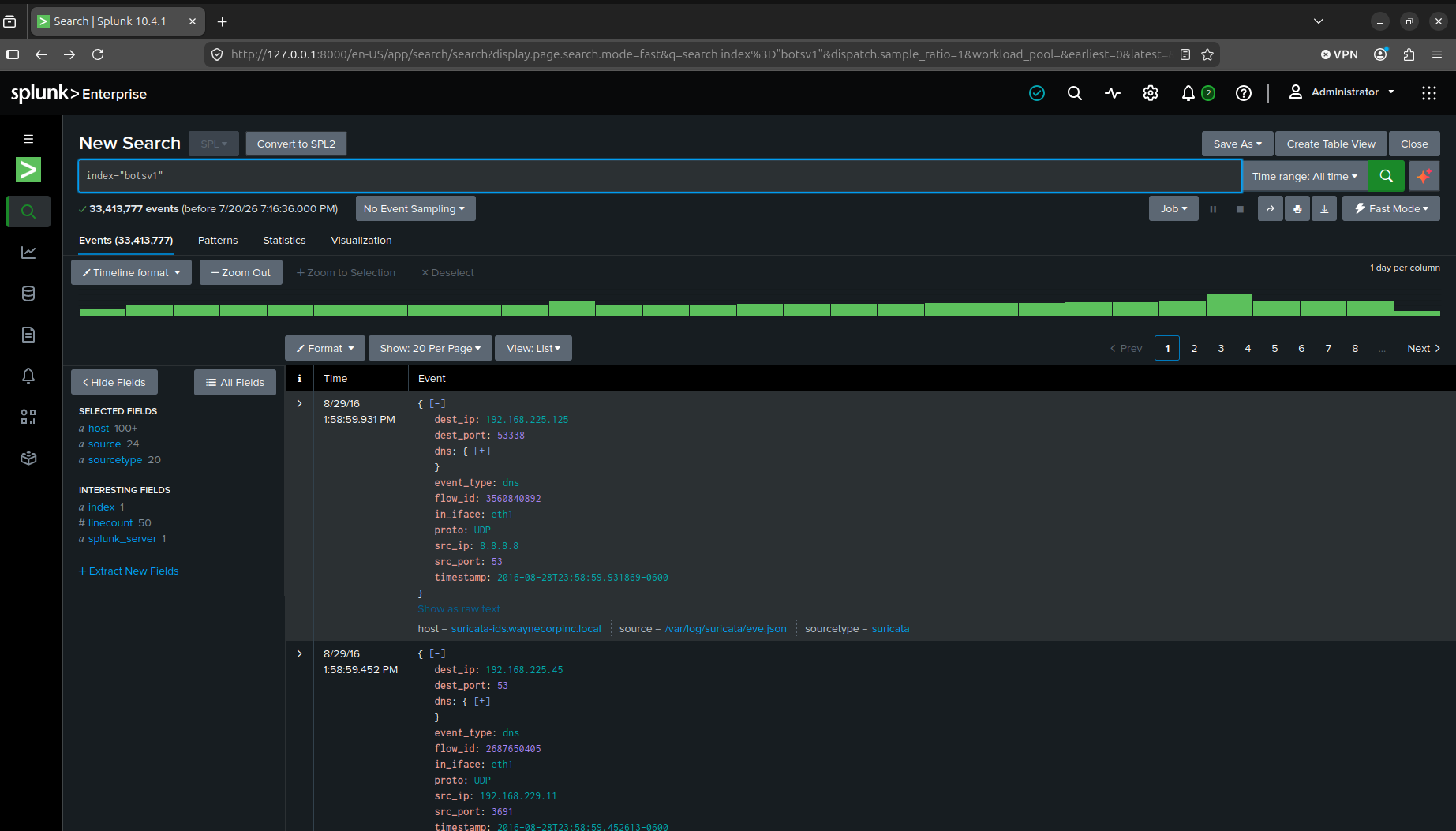
After searching the index, it came in at 33,413,777 events.
One more setup note. Splunk gates the official BOTSv1 answer key behind an email request to their security team, and that’s true for v1, v2, and v3 alike. I pulled the question text itself from a community mirror on GitHub, cross-checked it against multiple independent write-ups until it matched word for word, and I’m citing Splunk’s own announcement post and CyberDefenders, which currently hosts the live challenge. Sources are at the bottom of this post.
From here on I’m working through Splunk’s official Scenario 1 question set, seventeen questions, in order.
Finding the attacker (Q1–Q3)
Q1. What is the likely IPv4 address of someone from the Po1s0n1vy group scanning imreallynotbatman.com for web application vulnerabilities?
Q2. What company created the web vulnerability scanner used by Po1s0n1vy? Type the company name.
Q3. What content management system is imreallynotbatman.com likely using?
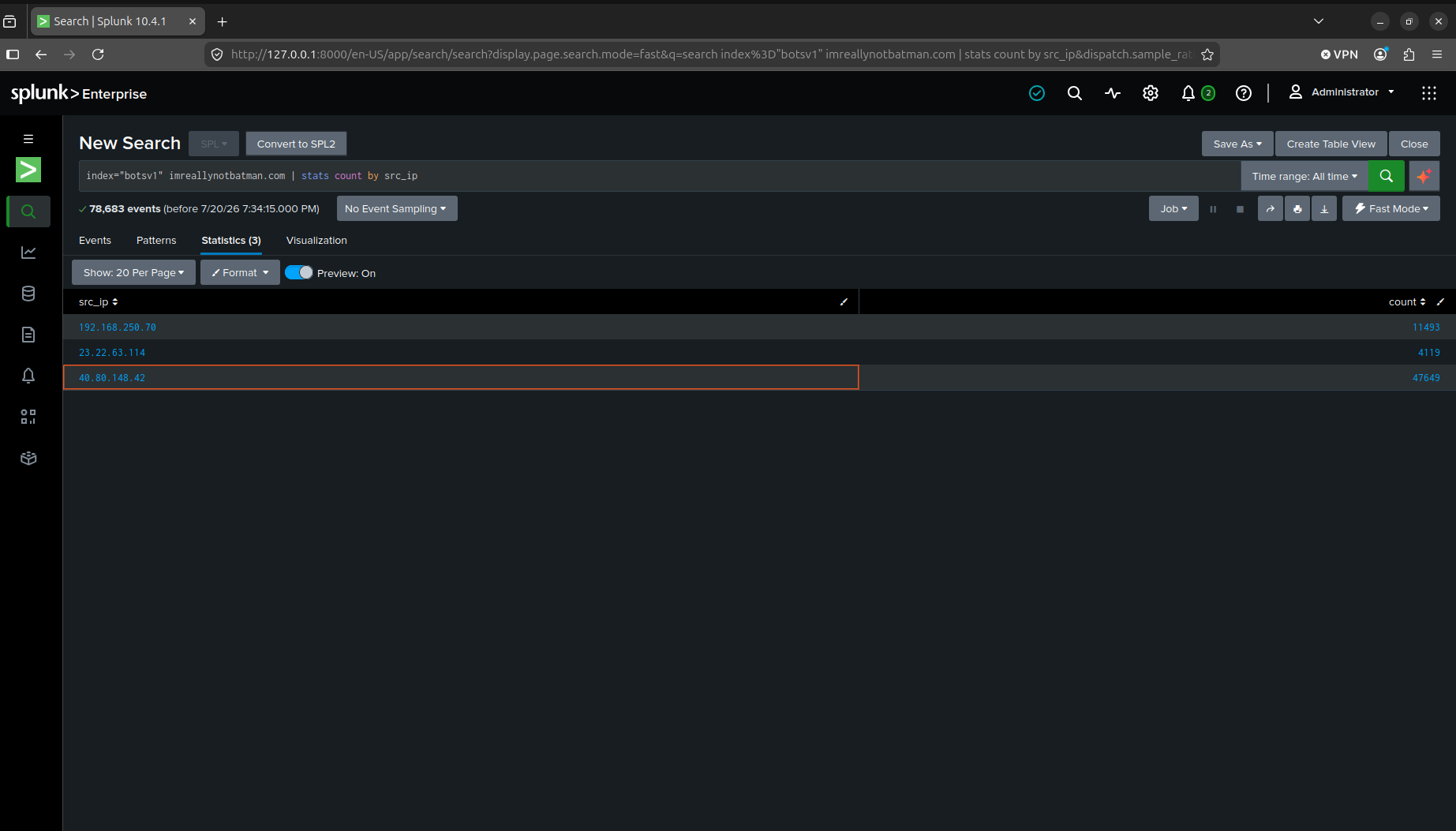
The scanning IP fell out of a plain stats count by src_ip on all imreallynotbatman.com traffic. One address, 40.80.148.42, pulled 47,649 hits while the second place was at 11,493. This gap was way too unnatural to actually be human.
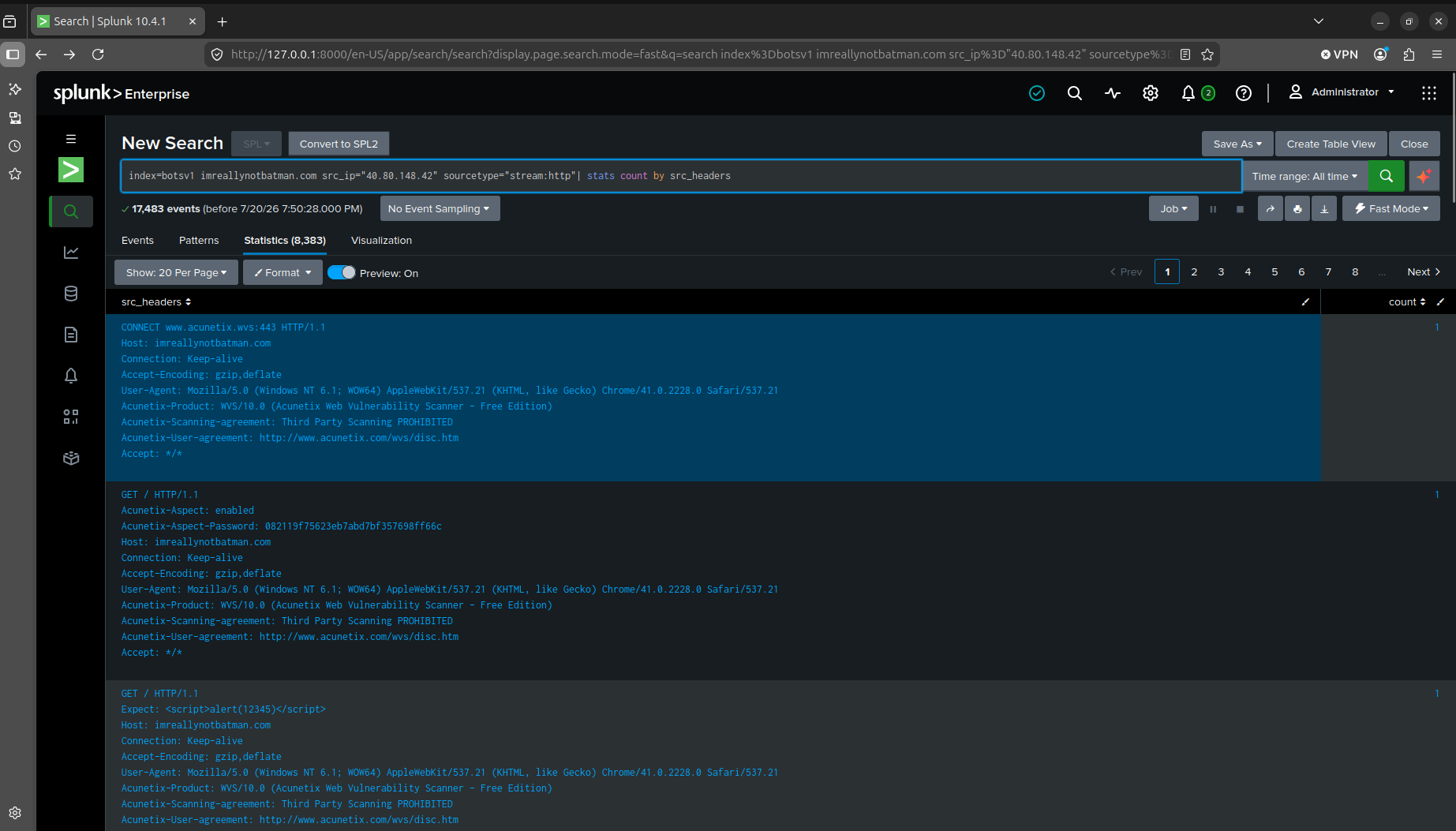
The scanner vendor didn’t need any guessing since it identified itself. Pulling the raw src_headers from that IP showed Acunetix-Product: WVS/10.0, plus an Acunetix scanning-agreement header right next to it. The tool was telling the target exactly what was hitting it.
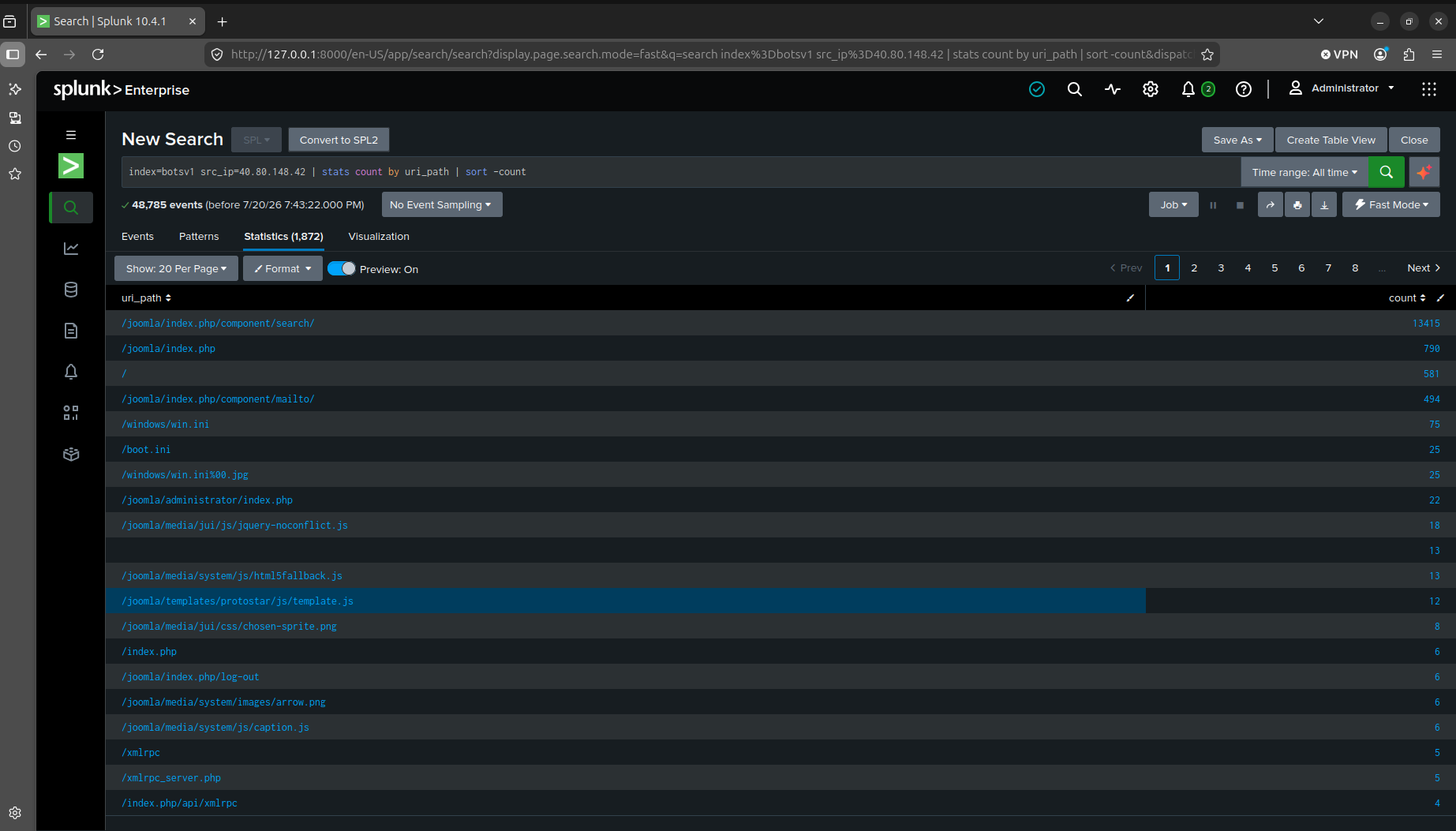
The CMS came from the URL structure itself. A stats count by uri_path search showed almost every top path prefixed with /joomla/. Joomla.
The defacement, and getting the mechanism wrong (Q4–Q5)
Q4. What is the name of the file that defaced the imreallynotbatman.com website? Please submit only the name of the file with extension?
Q5. This attack used dynamic DNS to resolve to the malicious IP. What fully qualified domain name (FQDN) is associated with this attack?
This is where I spent the most time on dead ends. I first went after the known OpenFlashChart upload vulnerability (ofc_upload_image.php), as after doing some research, I found out it’s a documented Joomla flaw from 2016. It turned up nothing but 404s from the scanner, probed, and never exploited. Next I tried filtering POST requests with multipart/form-data content type, on the theory that the defacement file would show up as an upload. Dead end again. Splunk’s Stream add-on doesn’t reliably capture full multipart POST bodies in this dataset, so there was nothing to find even if the upload had happened that way. I also tried dedup src_content across GET/200 responses to spot a visually distinct page body. Six unique bodies came back, however none of these were actually useful.
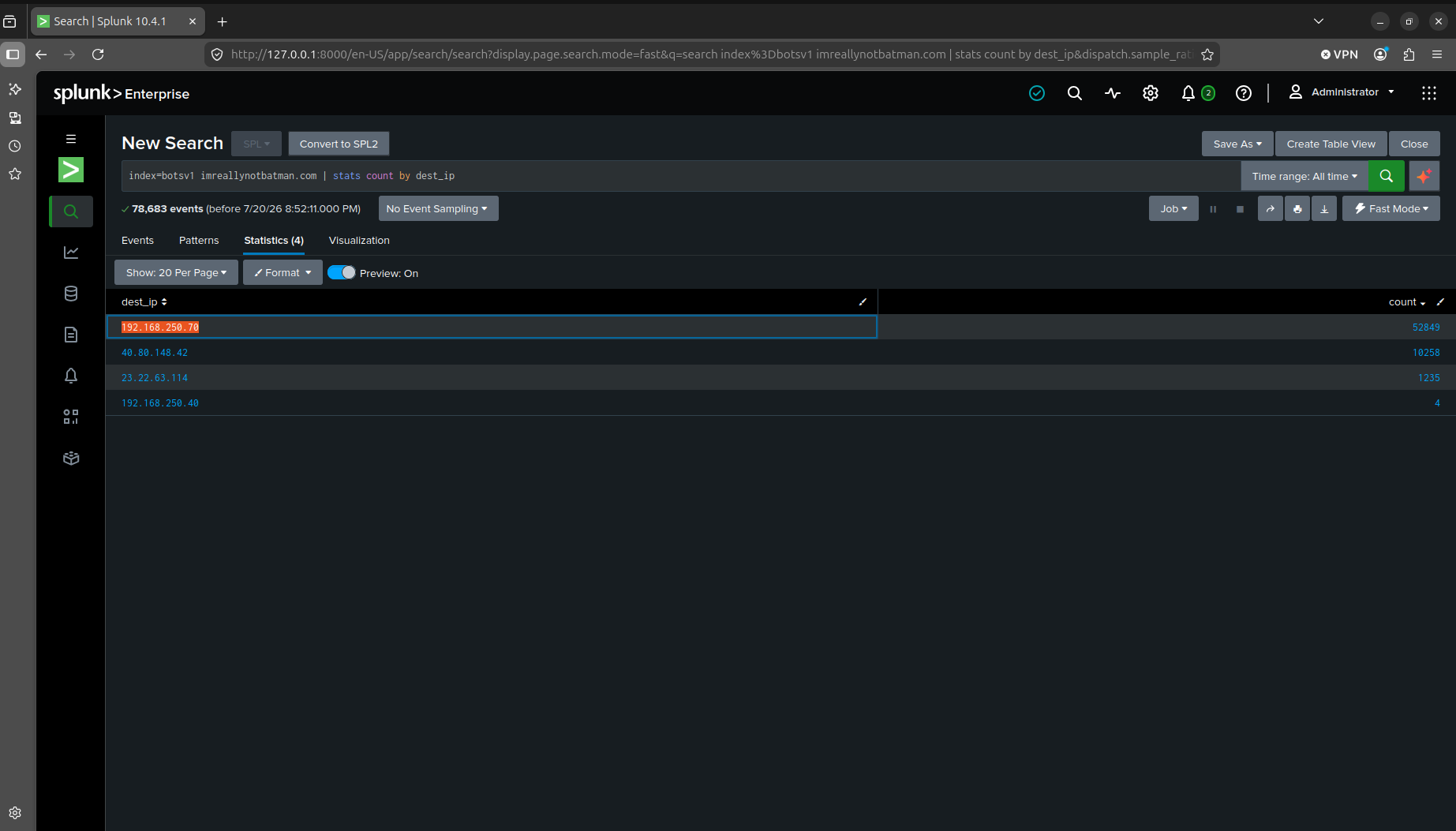
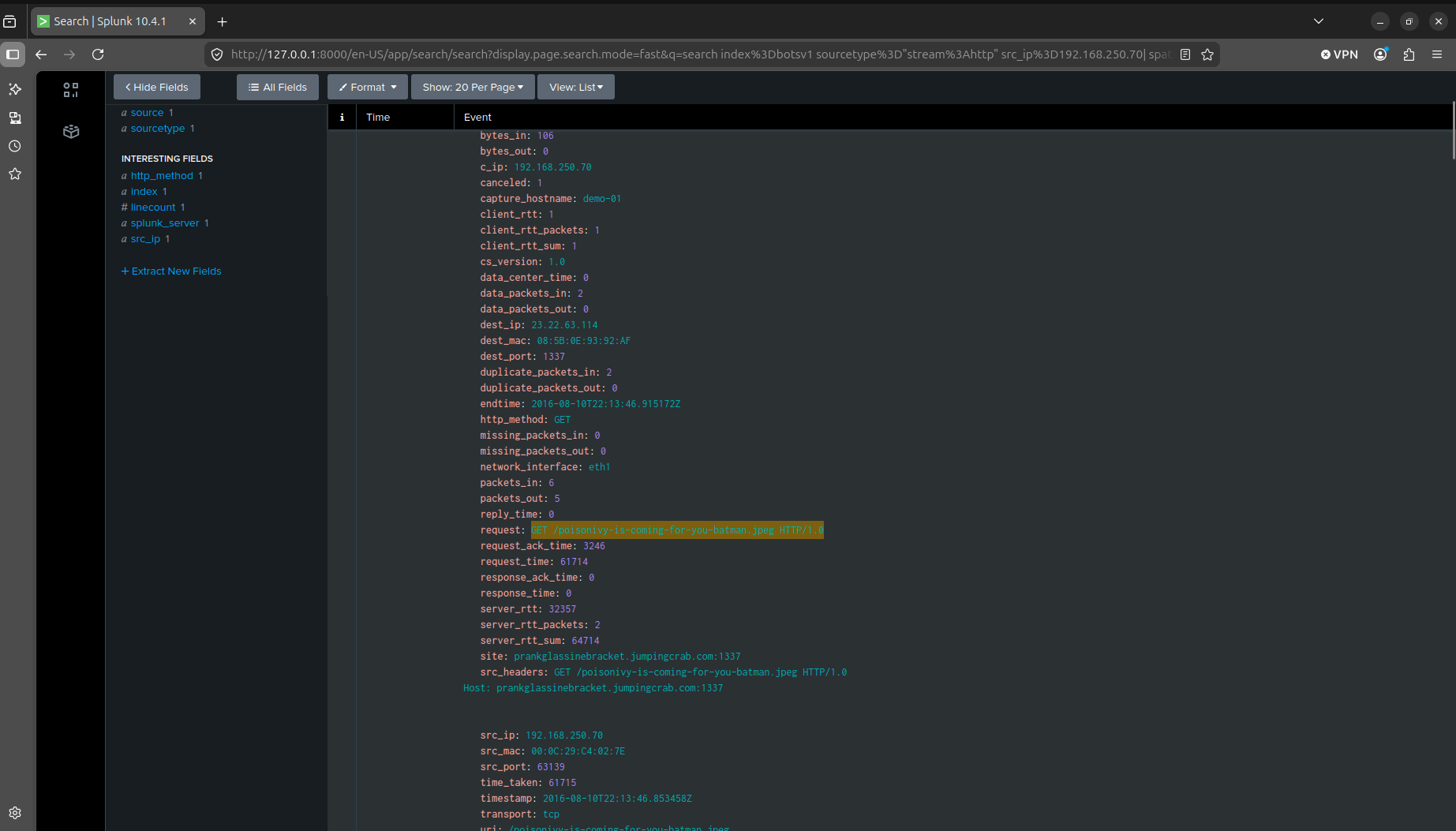
The actual answer was sitting in the server’s own outbound traffic, and I misread it at first. A search for sourcetype=stream:http src_ip=192.168.250.70 (the web server’s internal IP) returned events, and my first assumption was that this was some kind of response-direction tagging, the server’s IP showing up because it was answering a request. That’s wrong. The server itself had been compromised and was acting as a client, reaching out to prankglassinebracket.jumpingcrab.com on port 1337 (resolving to AWS IP 23.22.63.114) and pulling down poisonivy-is-coming-for-you-batman.jpeg. Once I understood that the server had already been compromised, I was able to answer both Q4 (the filename) and Q5 (the dynamic DNS domain tied to the malicious IP) at once.
Confirming Po1s0n1vy’s infrastructure (Q6)
Q6. What IPv4 address has Po1s0n1vy tied to domains that are pre-staged to attack Wayne Enterprises?
The server’s outbound traffic also surfaced a webshell call to agent.php, hit by 23.22.63.114 with a Host header set to a third IP, 71.39.18.126, that had nothing to do with the actual connection.
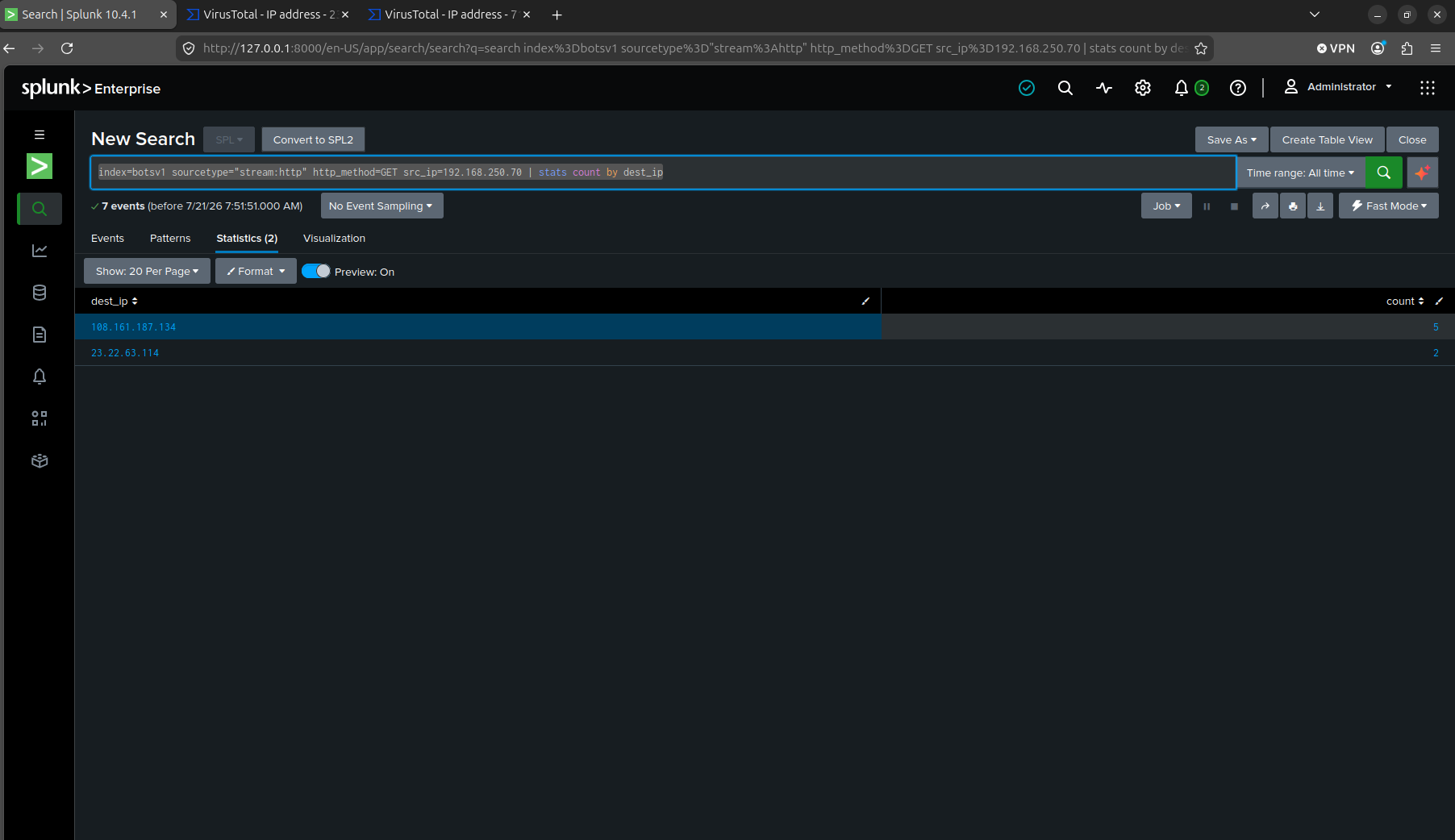
A broader pivot, stats count by dest_ip on every outbound GET from the compromised server, turned up two more candidate IPs to check, 108.161.187.134 and the already-known 23.22.63.114. I ran all three, including 71.39.18.126 from the Host header, through VirusTotal.
108.161.187.134 was a clean dead end. Nothing pointing at Wayne Enterprises or Po1s0n1vy.
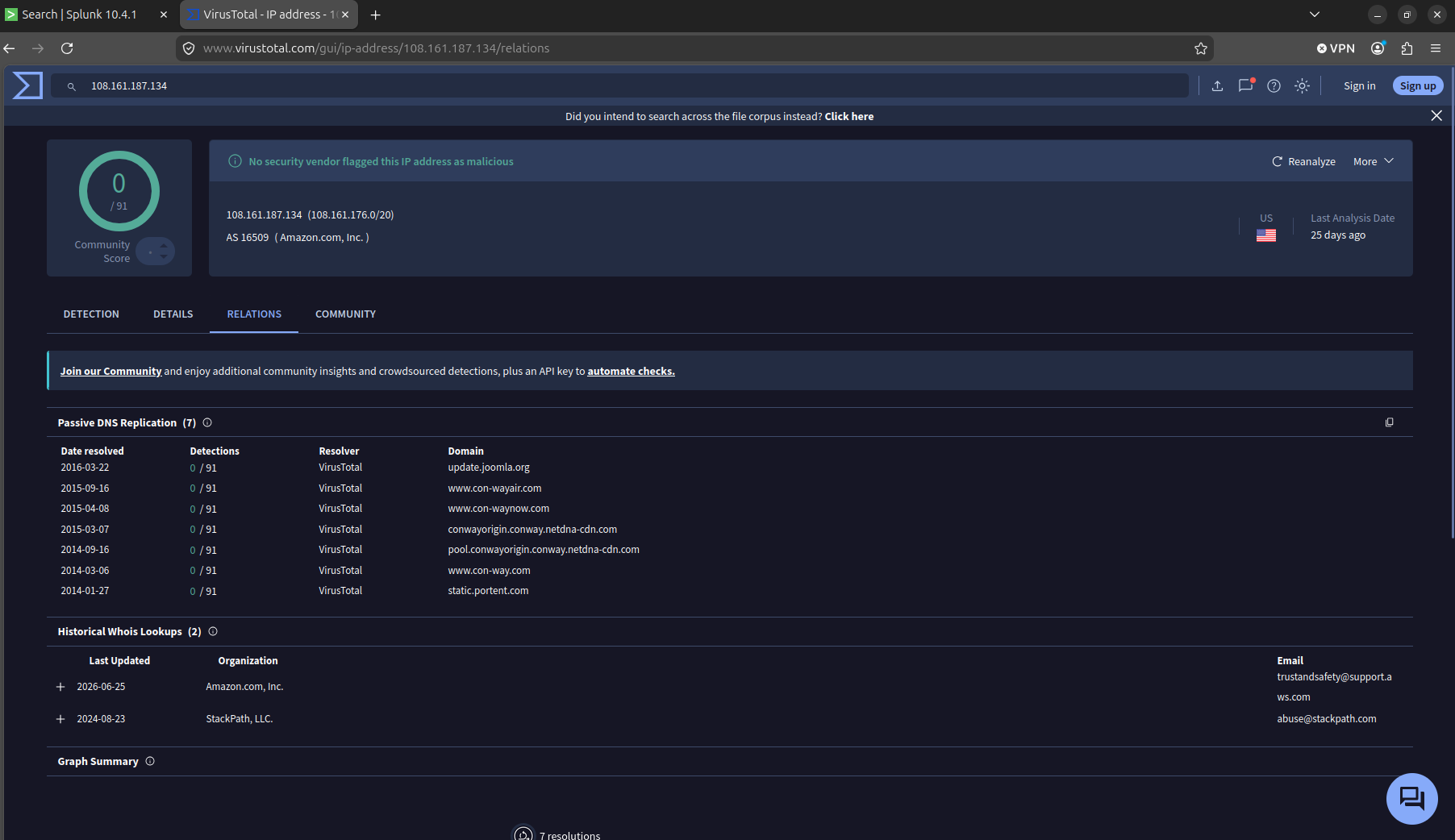
71.39.18.126 looked a lot more promising than the first. It had some correlation with waynecorpinc.com and imreallynotbatman.com, the actual Wayne domains. However, that’s where it ended at. There was no malware samples related to it, and had no link to po1s0n1vy.com.
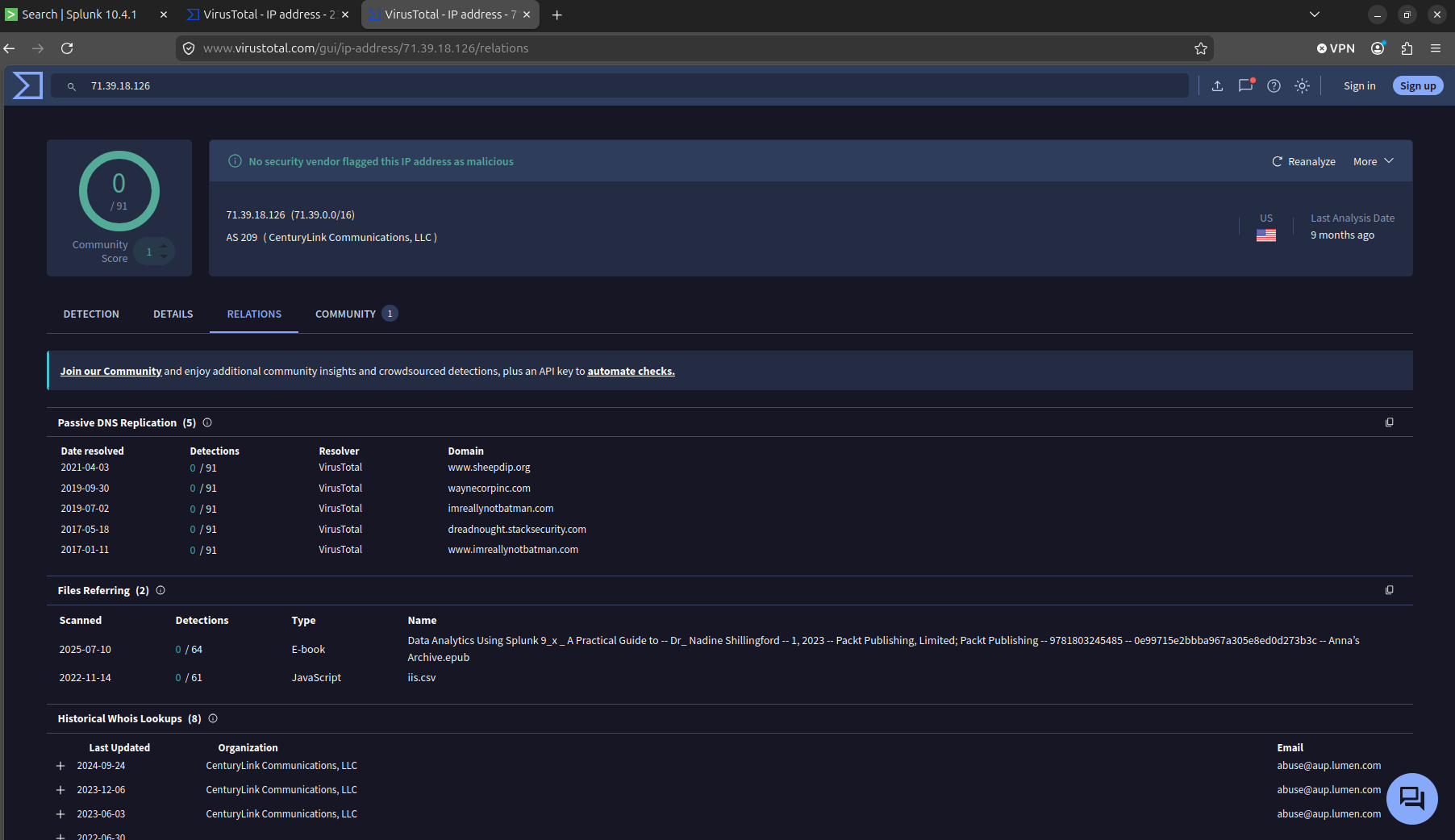
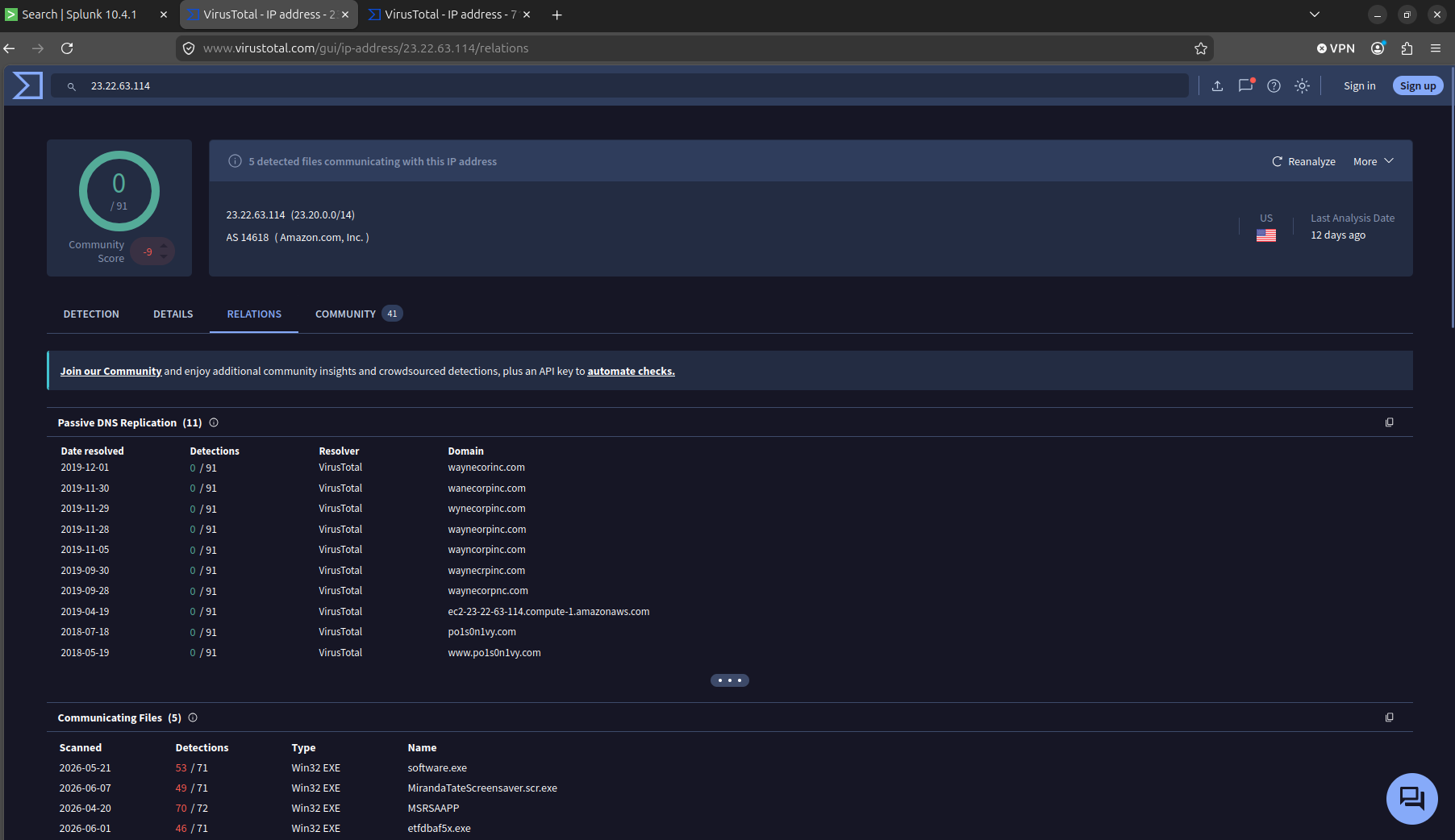
23.22.63.114 was the real deal. It had loaded with misspellings of Wayne Corp, waynecorinc.com, wanecorpinc.com, wynecorpinc.com, wayneorpinc.com, wayncorpinc.com, waynecrpinc.com, waynecorpnc.com, and it had direct relations to po1s0n1vy.com and www.po1s0n1vy.com. There was also five known malware samples that were related to it, including a file named MirandaTateScreensaver.scr.exe that would pop up again later.
The brute force begins (Q7–Q9)
Q7. What IPv4 address is likely attempting a brute force password attack against imreallynotbatman.com?
Q8. What is the name of the executable uploaded by Po1s0n1vy?
Q9. What is the MD5 hash of the executable uploaded?
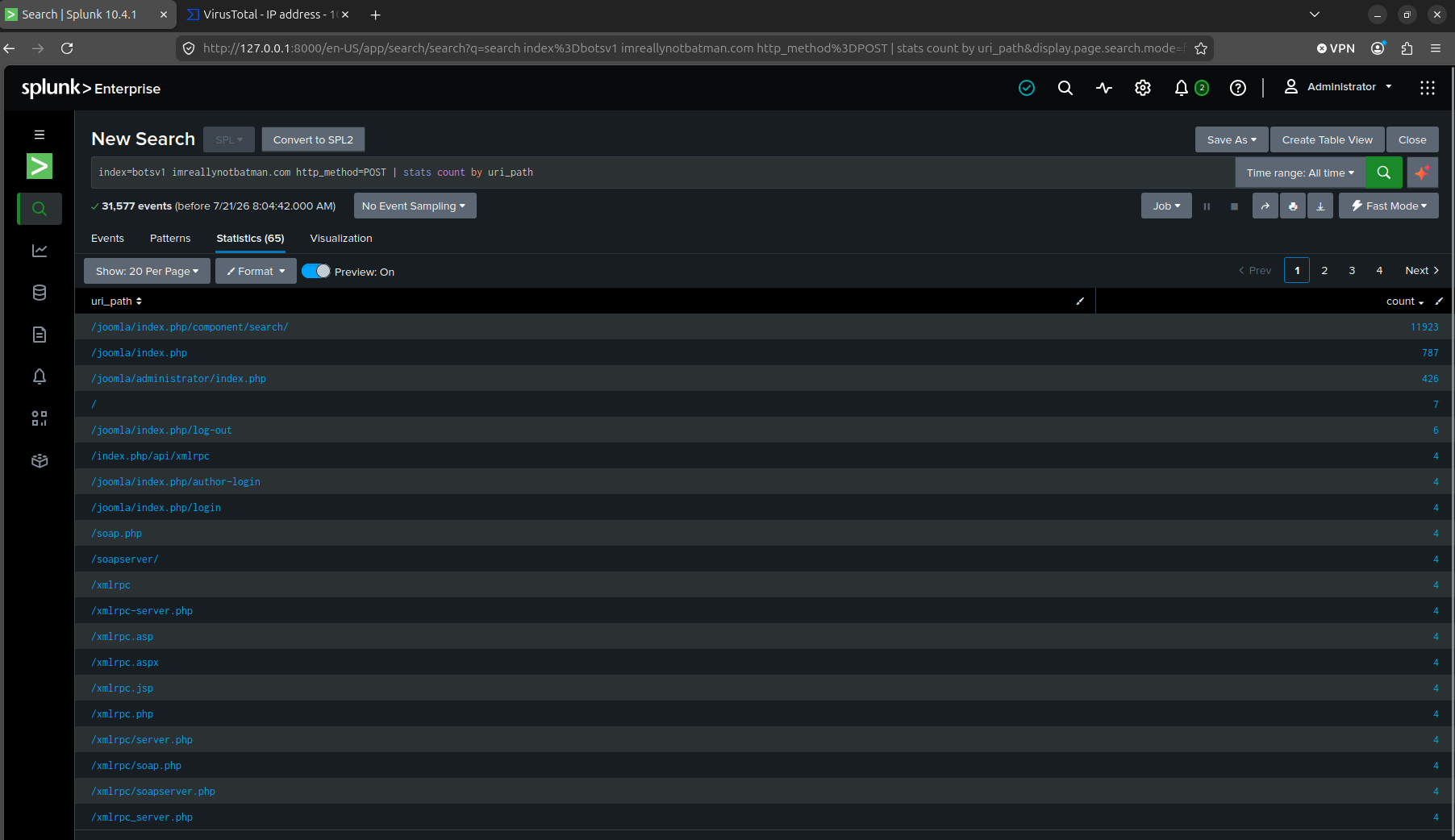
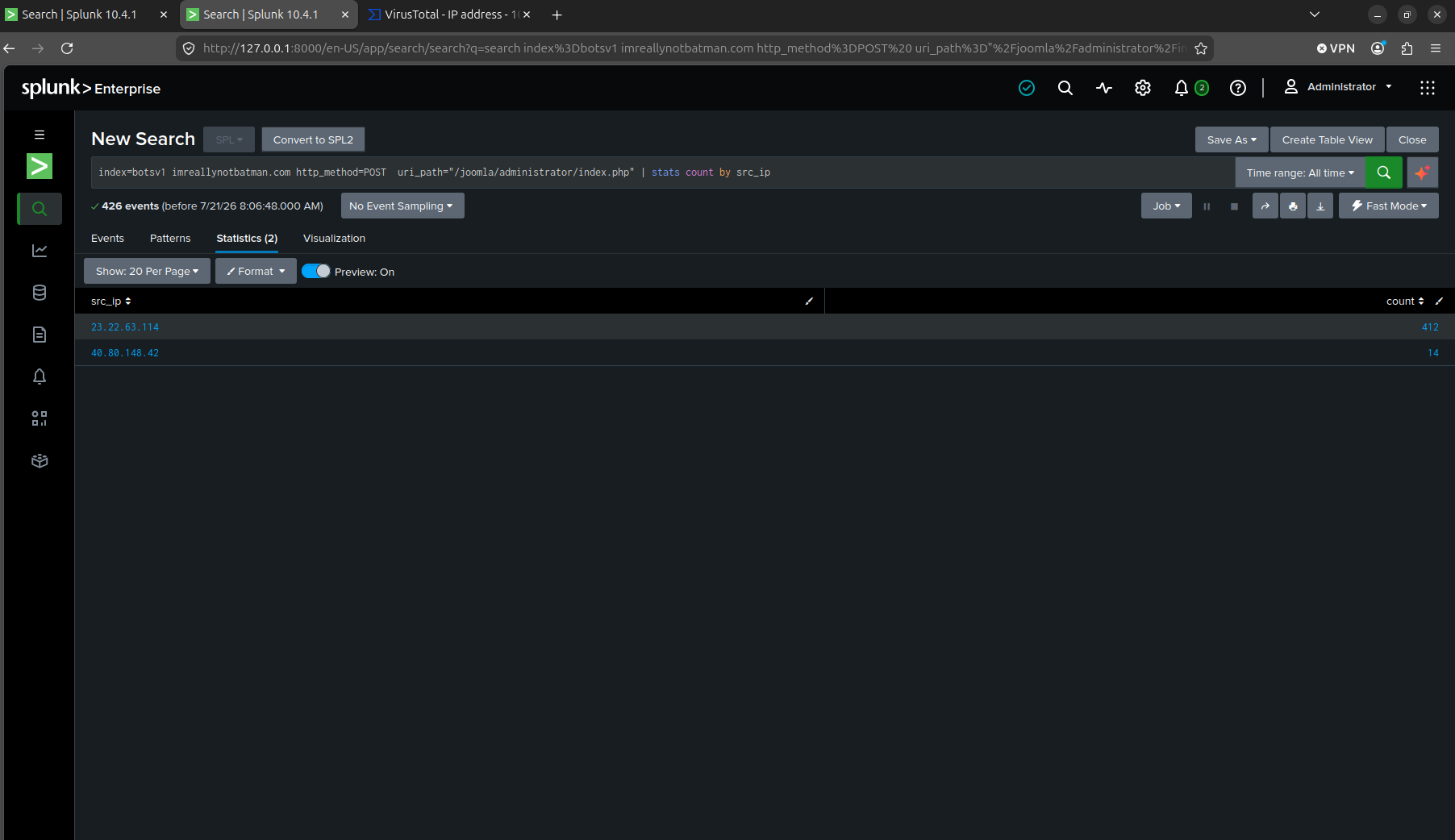
Filtering POST traffic by uri_path first surfaced noise. The site’s search component alone had over 11,000 hits and had nothing to do with authentication. Narrowing to the actual admin login endpoint, /joomla/administrator/index.php, gave a clean split, 23.22.63.114 with 412 POSTs against 40.80.148.42 with 14. The gap between those two numbers is the brute force.
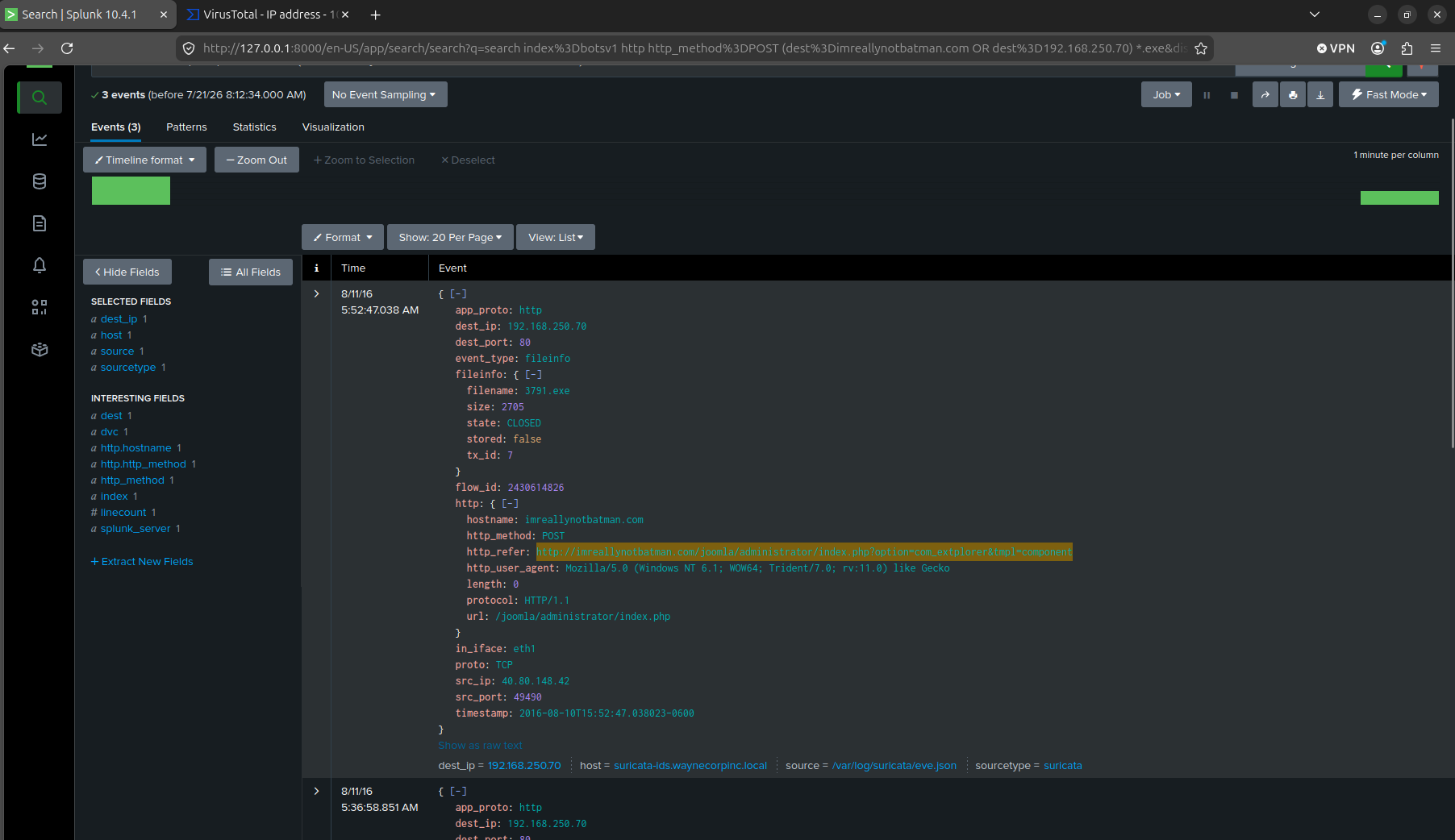
The uploaded executable showed up in a Suricata fileinfo event. It found filename=3791.exe, uploaded through com_extplorer, Joomla’s file manager component and a known vector, from the same IP that ran the original scan.
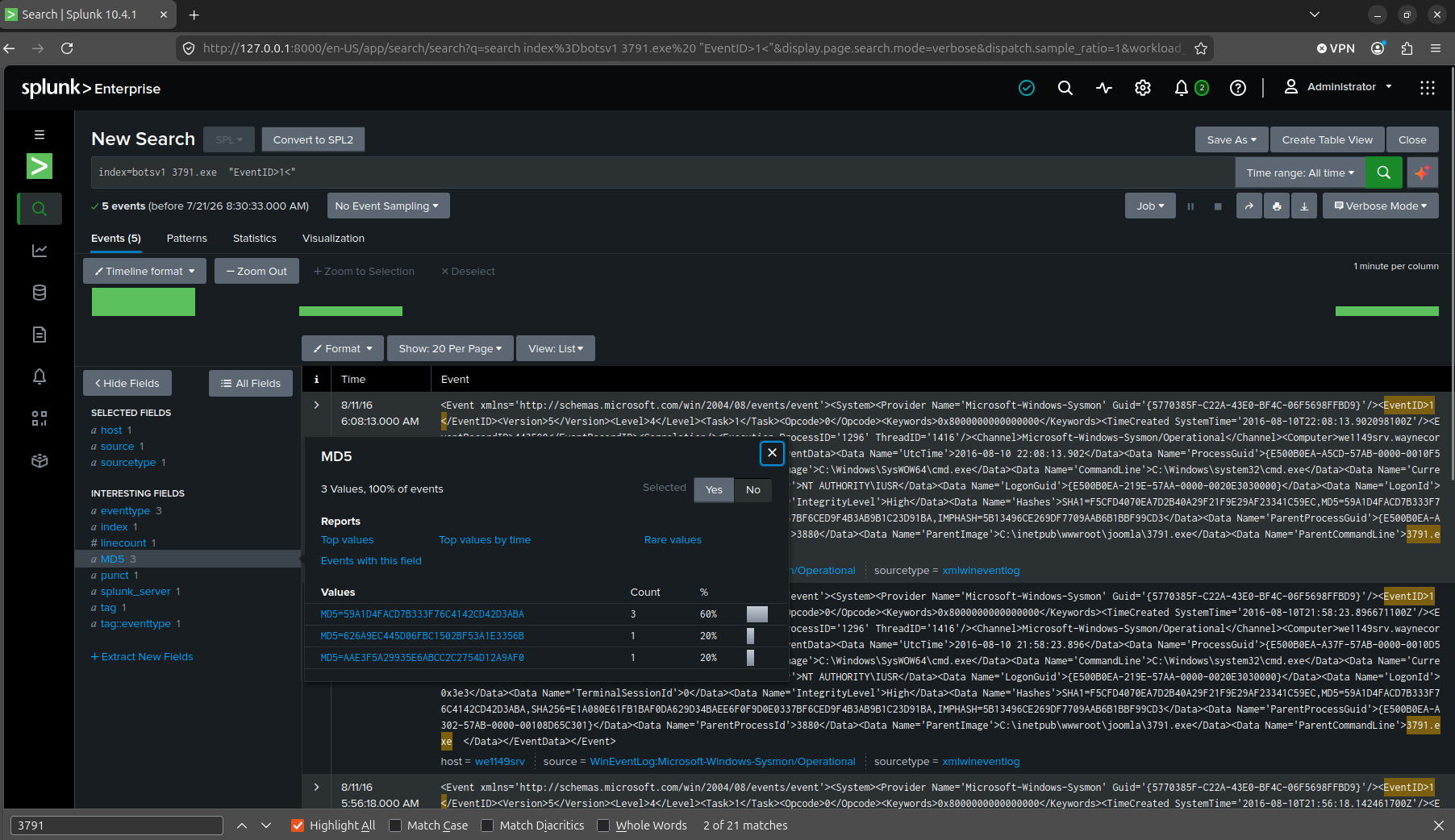
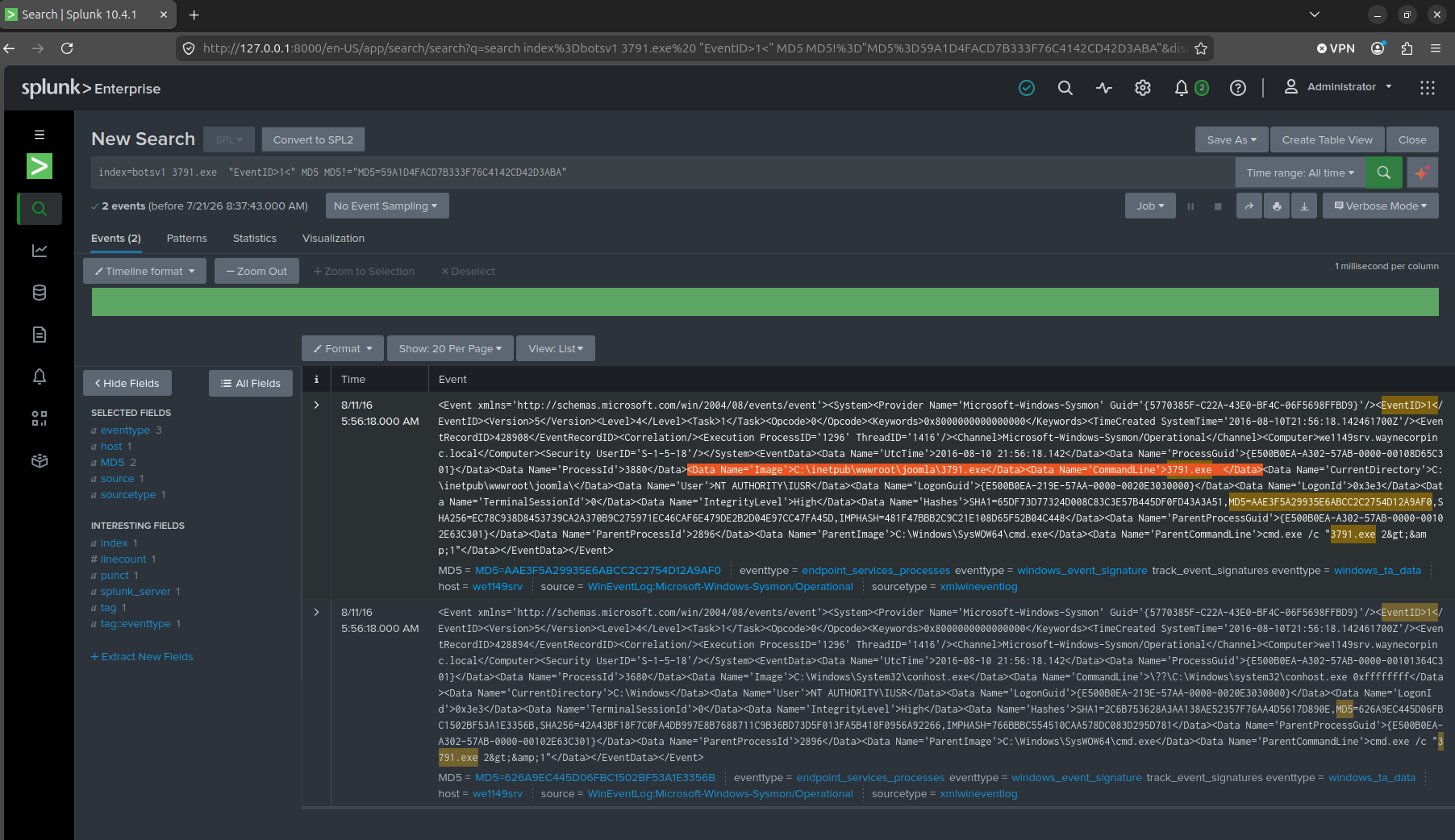
The Suricata fileinfo event doesn’t carry an MD5 field, so after scouting around for a bit, I pivoted to Sysmon (xmlwineventlog) on the host that ran the file. Filtering for any event mentioning 3791.exe pulled back three distinct hash values, because that filter also caught child processes it spawned (cmd.exe, conhost.exe), each with its own hash. The one I actually wanted was EventID 1, Process Create, where the Image field, not ParentImage, equals the executable’s own path: MD5=AAE3F5A29935E6ABCC2C2754D12A9AF0.
Spear-phishing with nothing to search (Q10–Q11)
Q10. GCPD reported that common TTPs (Tactics, Techniques, Procedures) for the Po1s0n1vy APT group, if initial compromise fails, is to send a spear phishing email with custom malware attached to their intended target. This malware is usually connected to Po1s0n1vy’s initial attack infrastructure. Using research techniques, provide the SHA256 hash of this malware.
Q11. What special hex code is associated with the customized malware discussed in question 10?
I checked every sourcetype in the dataset before starting this question and confirmed there’s no email or SMTP data indexed anywhere. That’s not a search I did wrong. The phishing email genuinely isn’t in Splunk. Answering it meant stepping outside the tool entirely and treating it as open-source research.
I pulled up VirusTotal’s Relations tab for 23.22.63.114 and found five files that had communicated with it. My first instinct was to just pick the one with the most plausible-sounding filename, but that’s guessing, not evidence, so I made myself justify the pick instead. MirandaTateScreensaver.scr.exe’s VirusTotal history showed a first submission date of August 16, 2016, and a creation timestamp of May 25, 2016, both consistent with malware staged well ahead of a campaign that ran August 10 to 11. The .scr.exe double extension is also a classic disguised-screensaver phishing pattern. That’s the evidence trail, not just the filename. The SHA256 is 9709473ab351387aab9e816eff3910b9f28a7a70202e250ed46dba8f820f34a8.
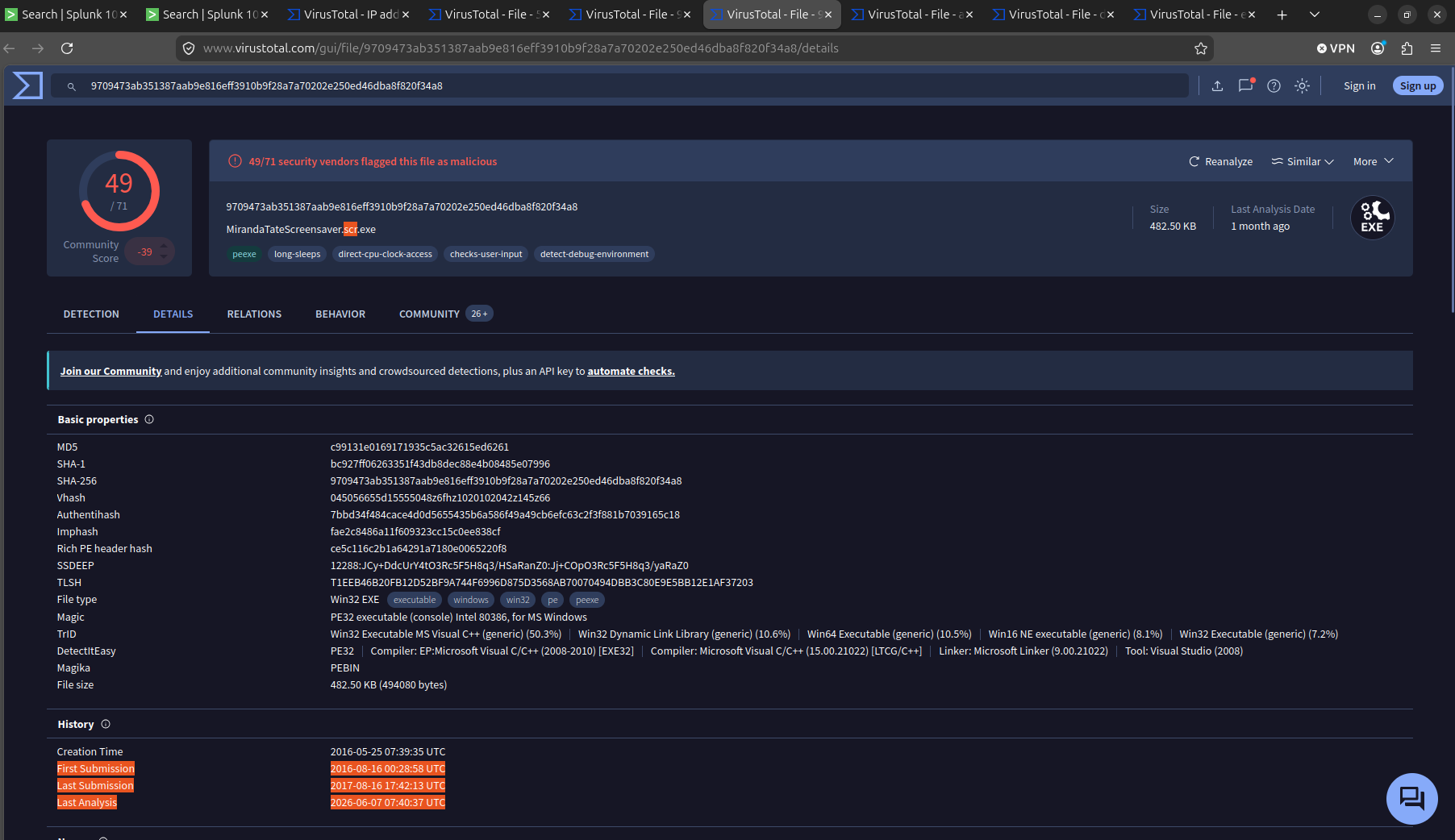
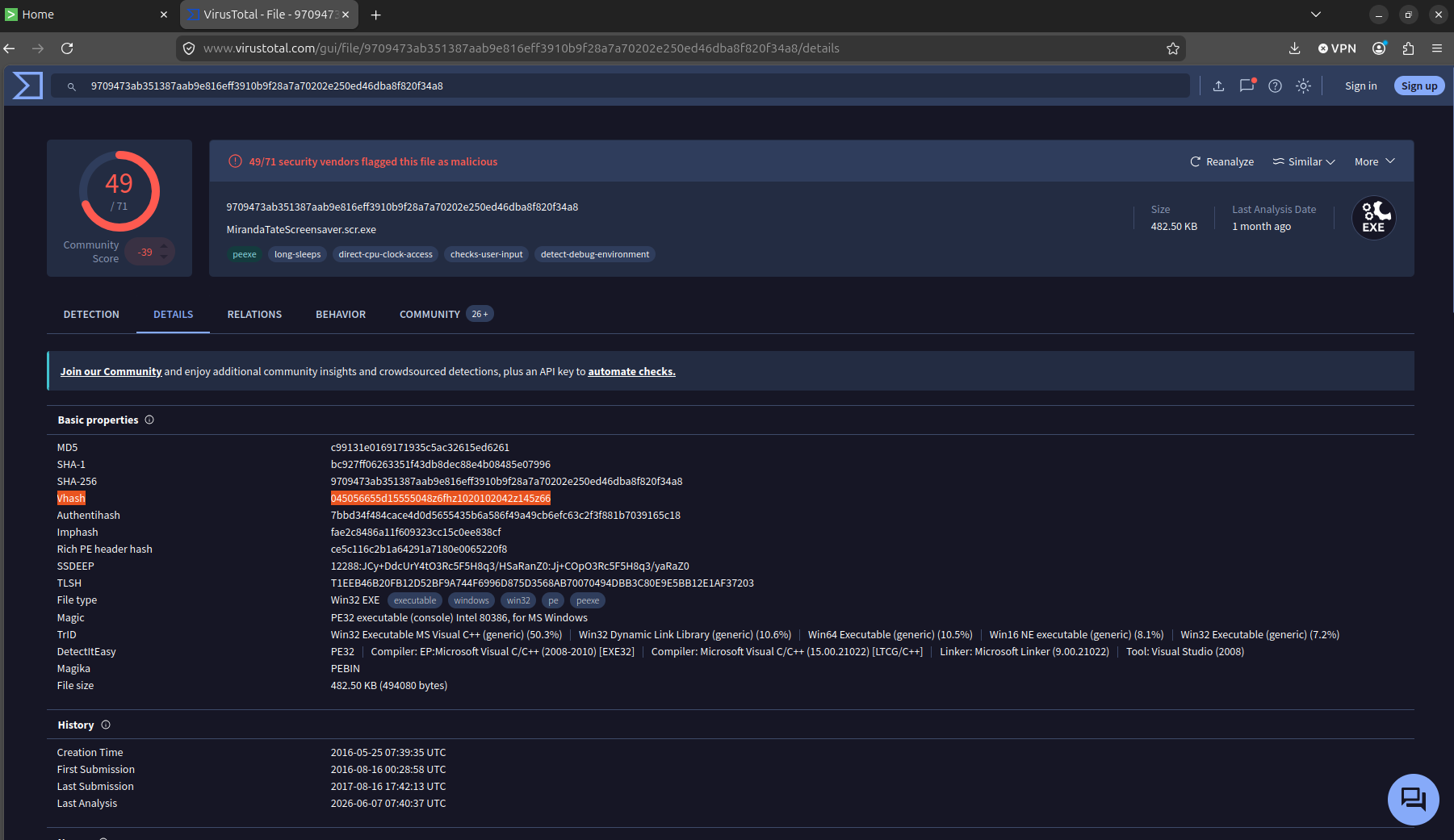
Question 11 asks for a “special hex code” tied to that malware, and this is where analyzing a decade-old dataset with current tools got genuinely interesting. VirusTotal’s Basic Properties block for that MD5, SHA1, SHA256, and also Vhash, Authentihash, Imphash, and a Rich PE header hash. BOTSv1’s answer key dates to around 2017, before VirusTotal’s Vhash field existed, so the intended answer was almost certainly Imphash. I went with Vhash anyway (045056655d15555048z6fhz1020102042z145z66), since it’s what current tooling actually surfaces first, and noted the discrepancy rather than pretending there’s one right answer. Worth knowing the difference either way. Imphash fingerprints a file’s imported function table, so it catches structurally identical malware even after minor edits, while Vhash is VirusTotal’s own similarity clustering, closer to fuzzy matching. Different jobs, and the “correct” one here depends on which decade’s tooling you’re standing in.
A Splunk default that quietly gets you (Q12)
Q12. What was the first brute force password used?
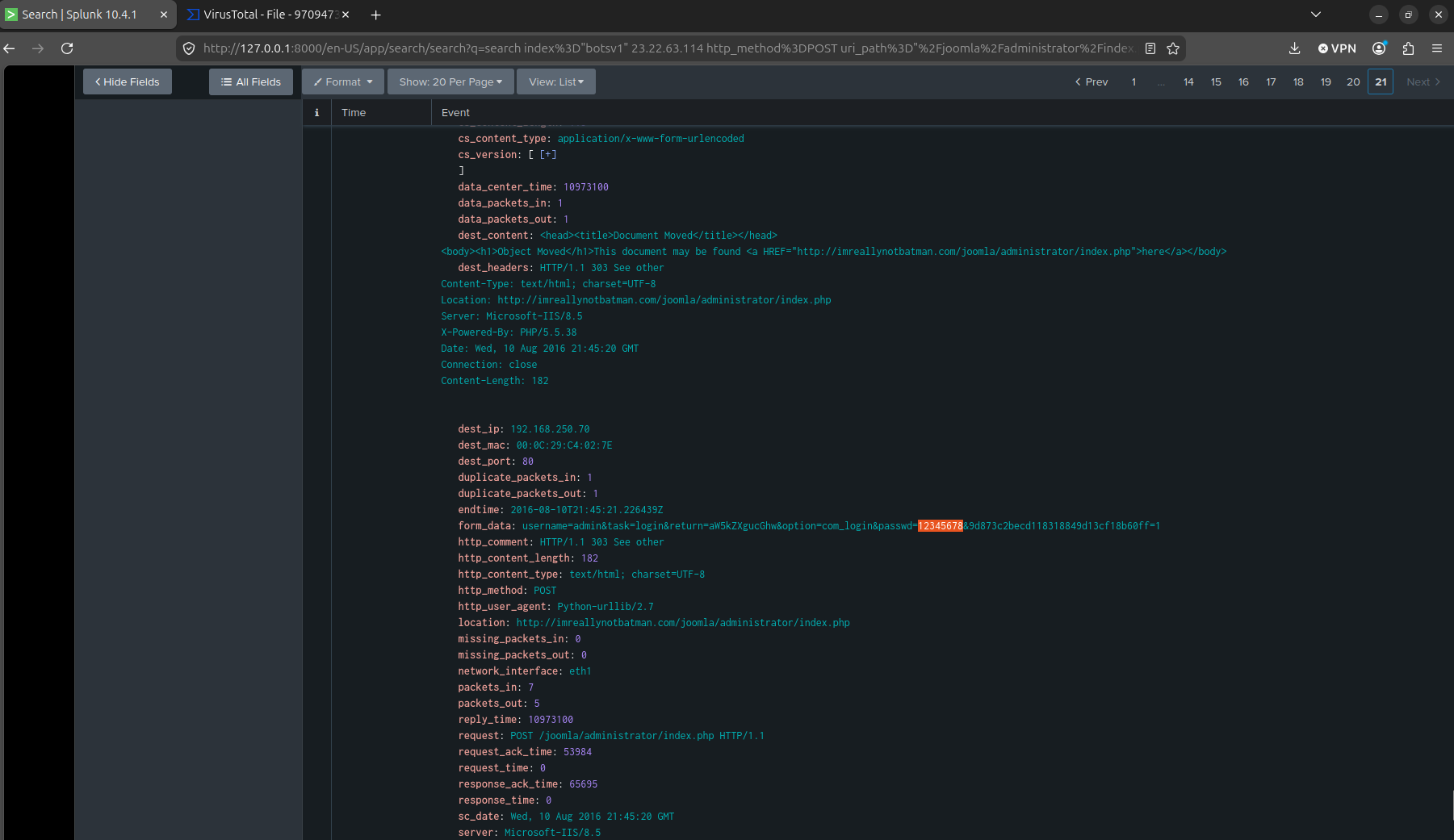
Splunk sorts results newest-first by default. Searching for “the first brute-force password” without an explicit time sort hands you the most recent attempt, not the earliest one. I caught this only because the password on the first results page didn’t look like an opening guess. Jumping to the last page of results instead gave the actual earliest event, with passwd=12345678. Small thing, but it’s exactly the kind of default that will quietly wreck a what-happened-first question if you don’t check for it.
Building a field instead of reading events by hand (Q13)
Q13. One of the passwords in the brute force attack is James Brodsky’s favorite Coldplay song. We are looking for a six character word on this one. Which is it?
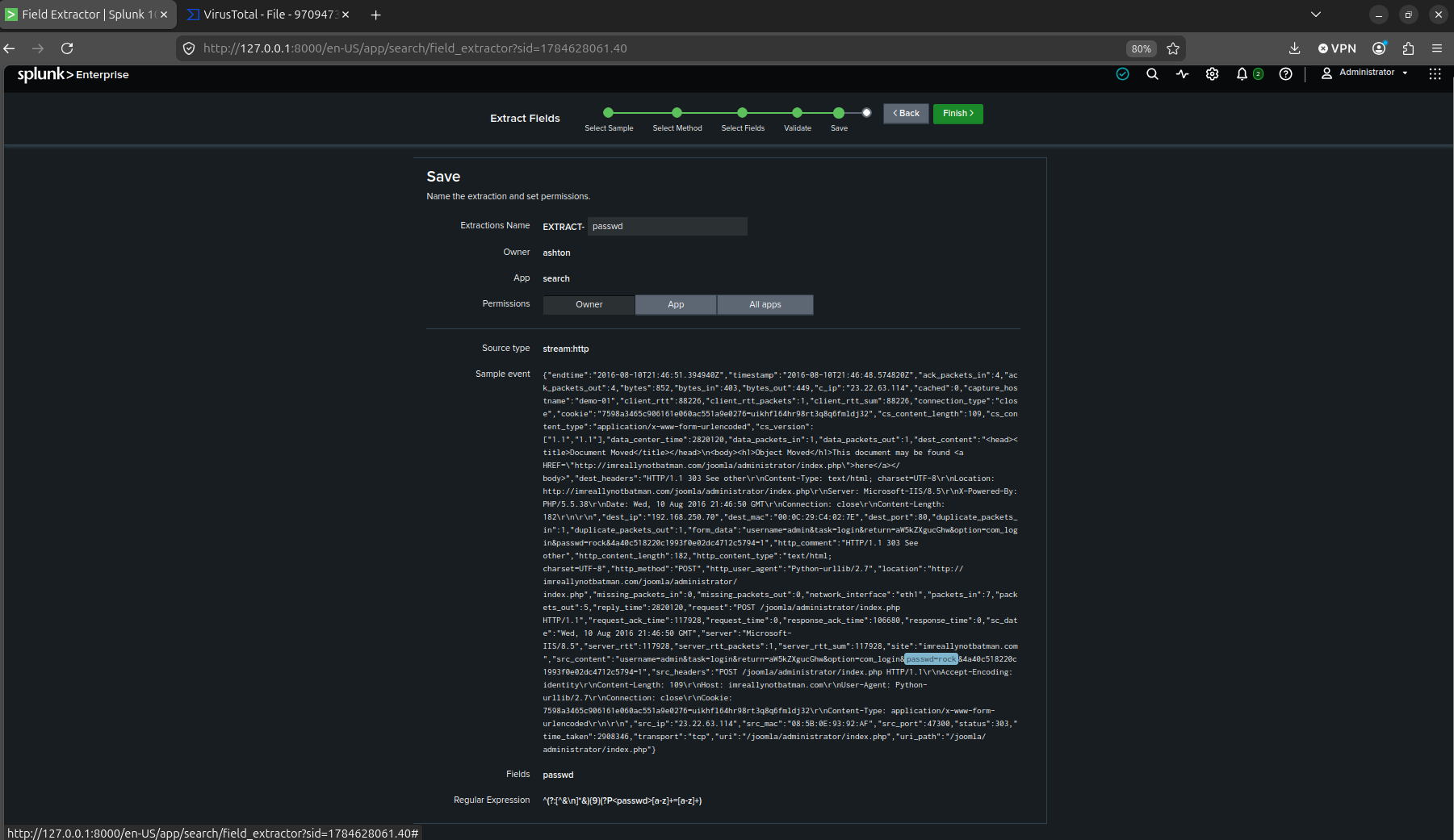
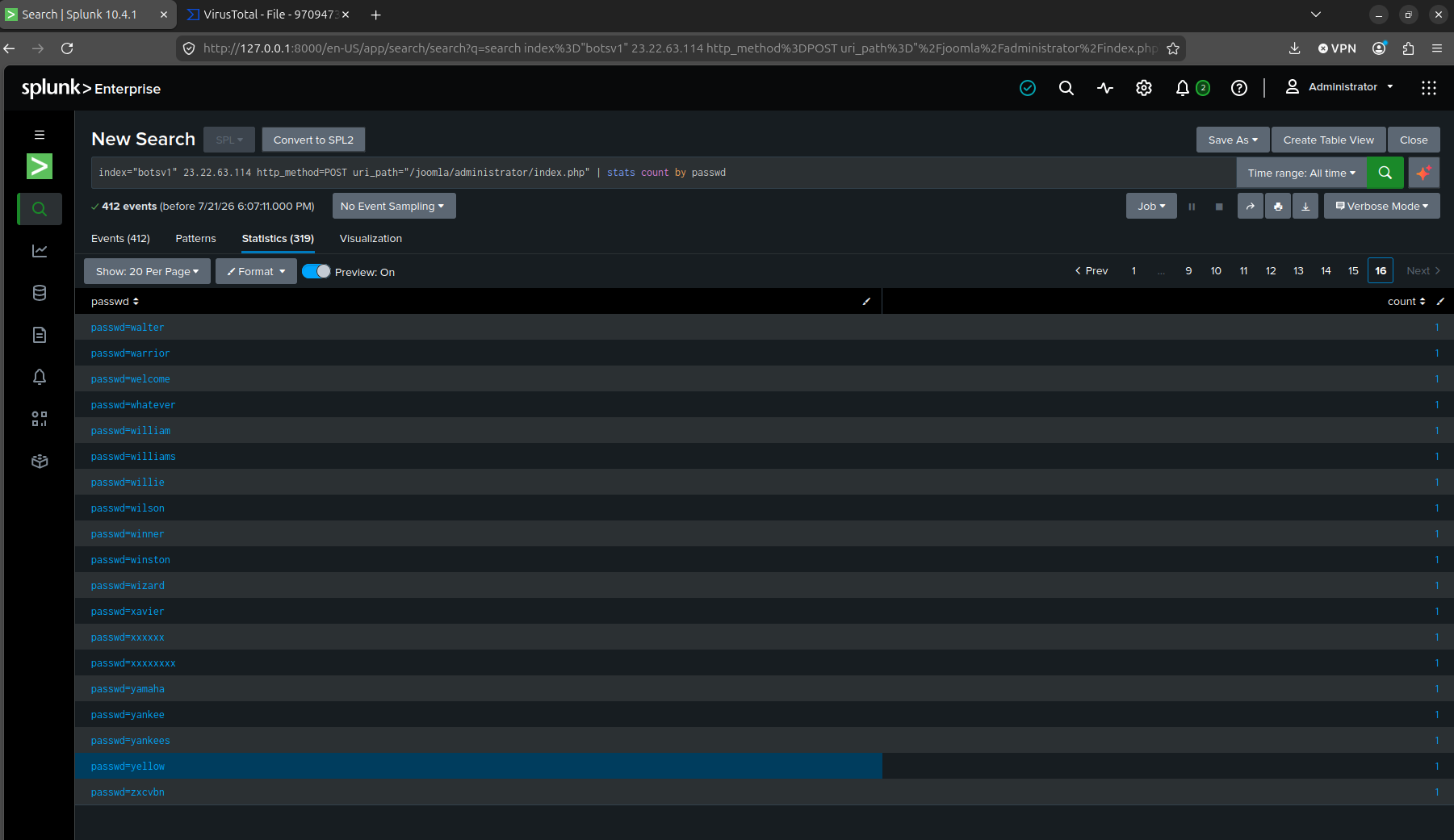
Up to this point I’d been pulling passwd= values out of raw src_content by eye, one event at a time. That doesn’t scale to 412 attempts. I used Splunk’s Extract Fields wizard to write a regex against the POST body and turn passwd into an actual queryable field, then ran stats count by passwd across all of them in one shot, 319 distinct values. yellow was in that list, the answer to Q13 (James Brodsky’s favorite Coldplay song, six characters).
The three wrong turns before the real answer (Q14)
Q14. What was the correct password for admin access to the content management system running “imreallynotbatman.com”?
This is the question that took the longest and taught me the most, so it gets its own section instead of a paragraph.
The question was simple to state. What was the correct admin password. My first assumption was that a successful login would return a different HTTP status code than a failed one. I was wrong however, Joomla does a POST/redirect pattern on both outcomes so you would not be able to tell by the status.
Second assumption, maybe the redirect Location header differs, a successful login redirecting somewhere different from a failed one, like an admin dashboard versus back to the login page. I checked all 412 automated attempts. Every single one redirects back to /administrator/index.php, success or failure. It turns out Joomla’s admin panel routes both the login screen and the post-login dashboard through that same URL, so the redirect target can’t distinguish them either.
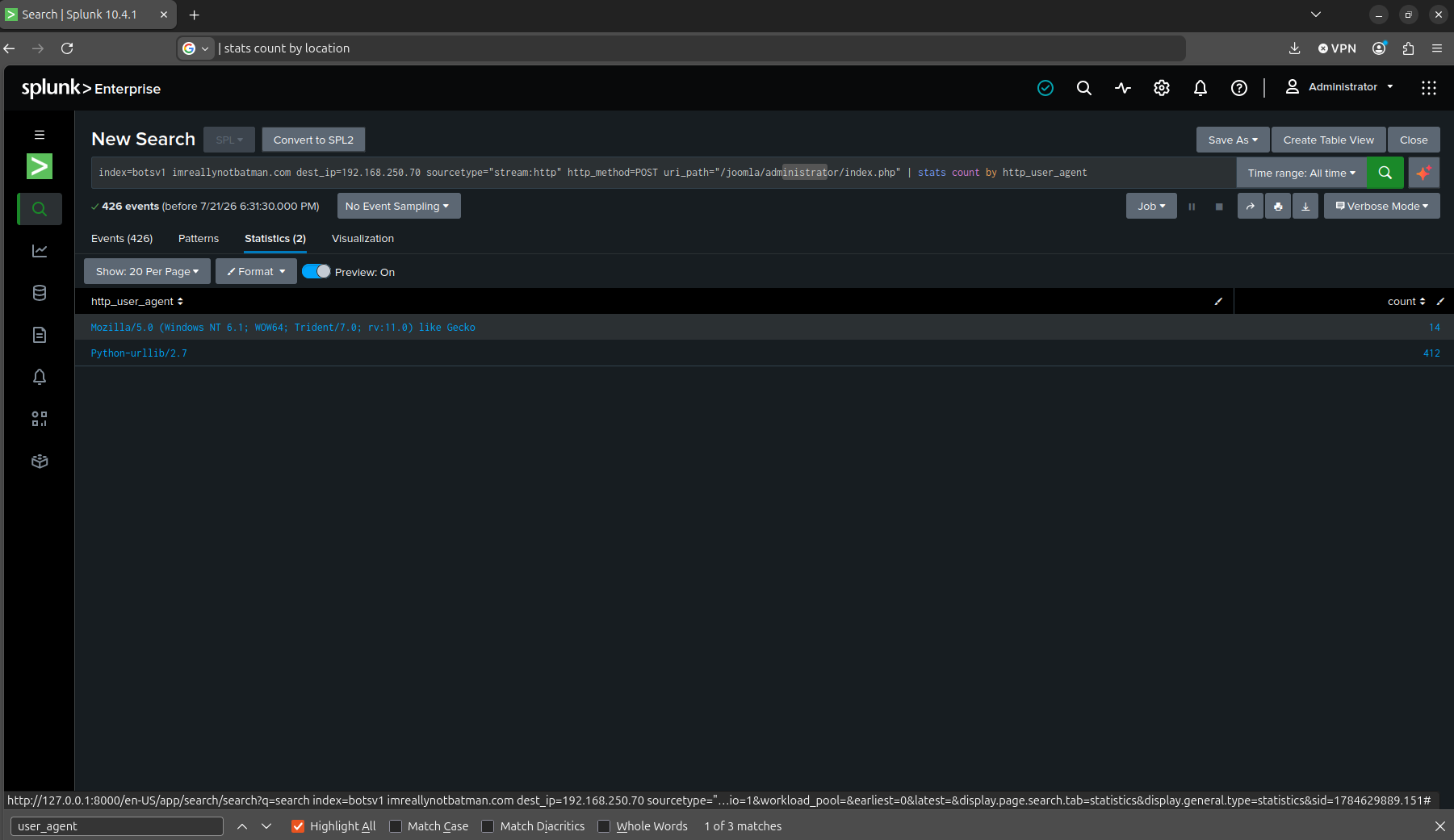
At that point I stopped looking at the response and grouped login attempts by http_user_agent instead. It worked. 412 attempts from Python-urllib/2.7, the automated brute-force script, and 14 from an actual browser, Mozilla/5.0 with Trident/7.0, coming from the scanning IP rather than the brute-force IP. Mozilla would probably be the real person checking it.
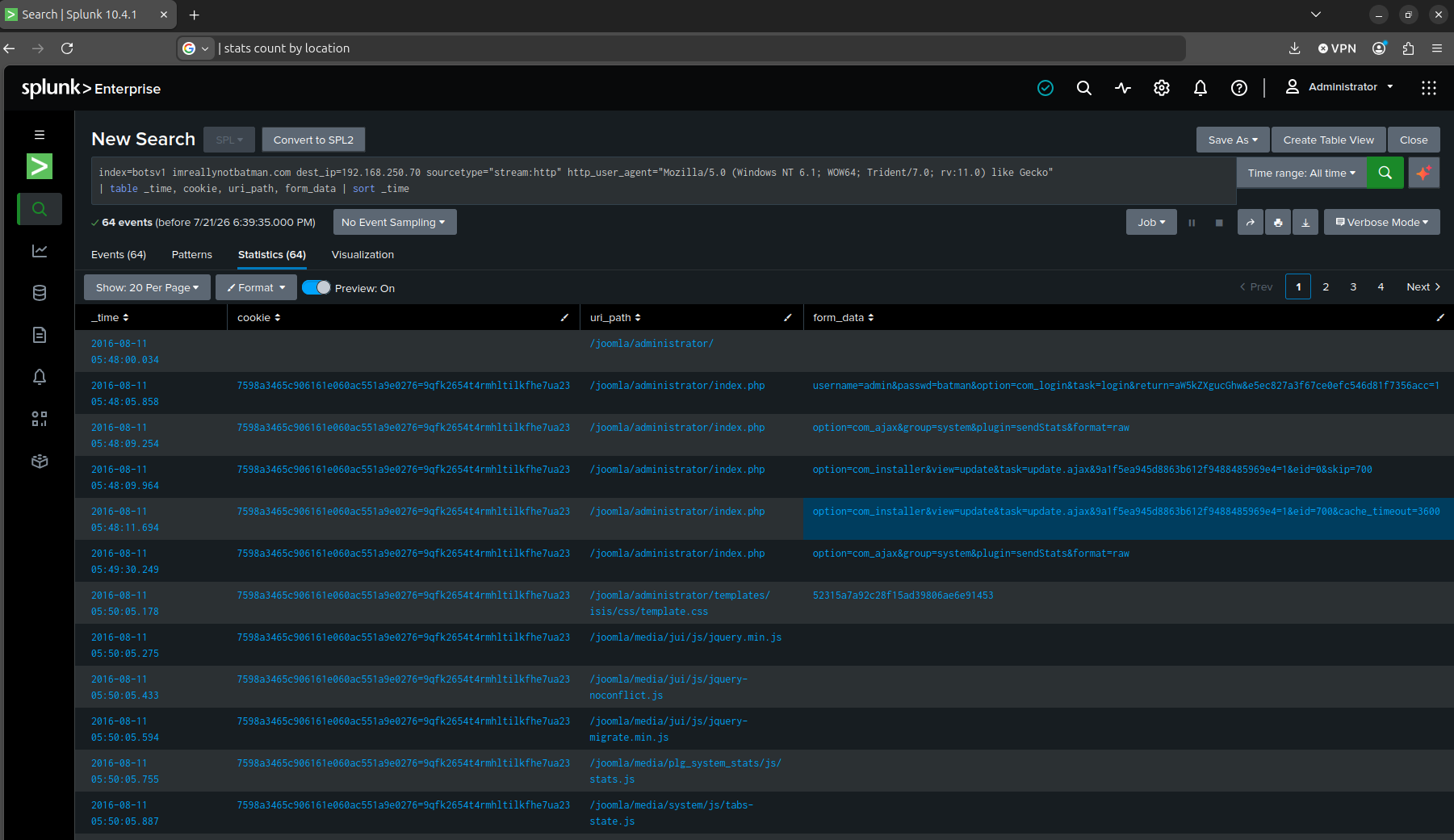
One of those 14 manual attempts submitted passwd=batman. Its redirect target still pointed back to the login page, so at a glance it looked like just another failure. The actual proof was in the session cookie. That exact cookie value showed up again on later requests to com_installer&view=install and com_ajax, actions only an authenticated admin session can make. batman was the password, and I only know that because I traced what the session did afterward, not because of anything the login event itself said.
The numbers behind the brute force (Q15–Q17)
Q15. What was the average password length used in the password brute forcing attempt?
Q16. How many seconds elapsed between the time the brute force password scan identified the correct password and the compromised login?
Q17. How many unique passwords were attempted in the brute force attempt?
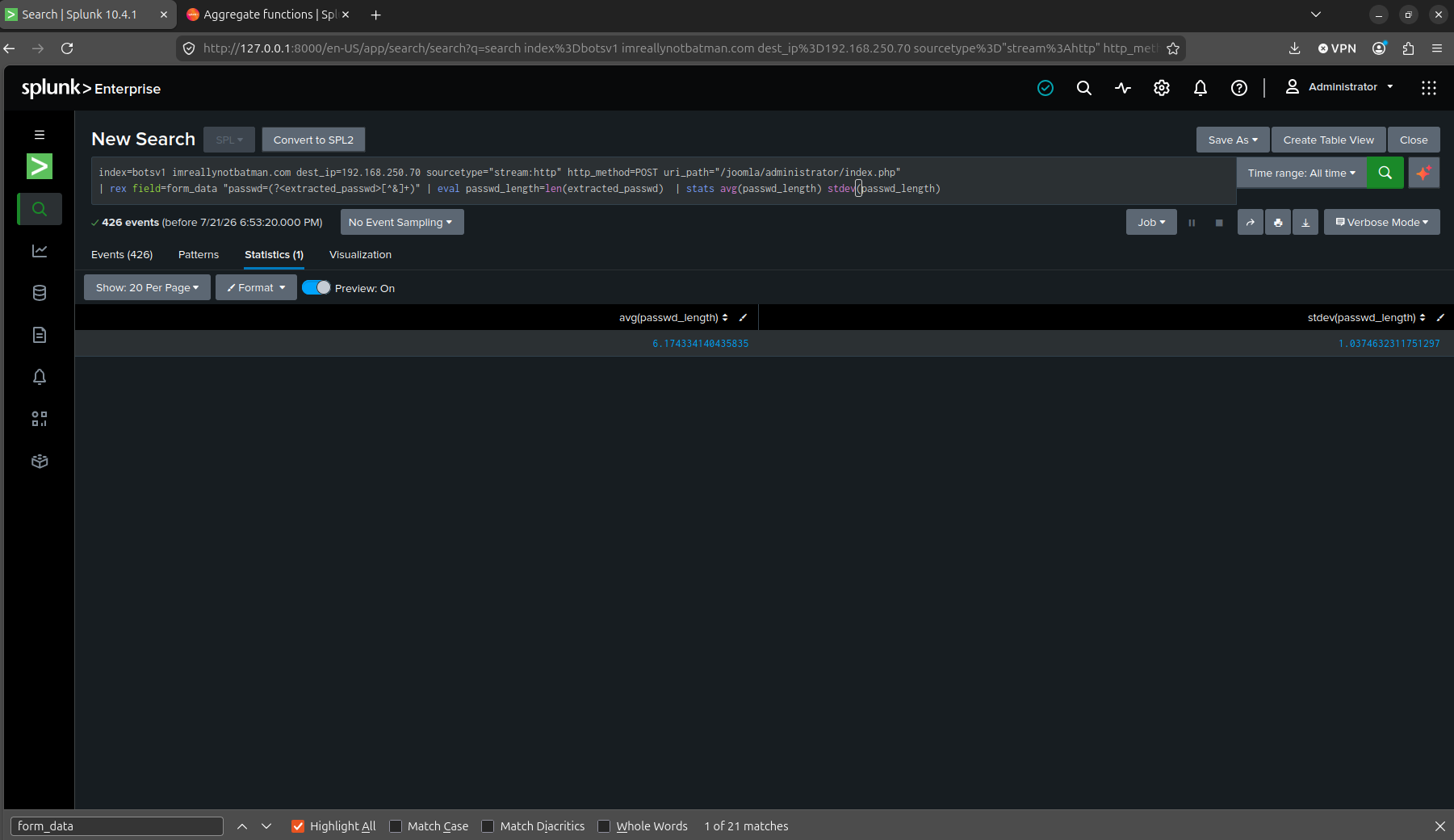
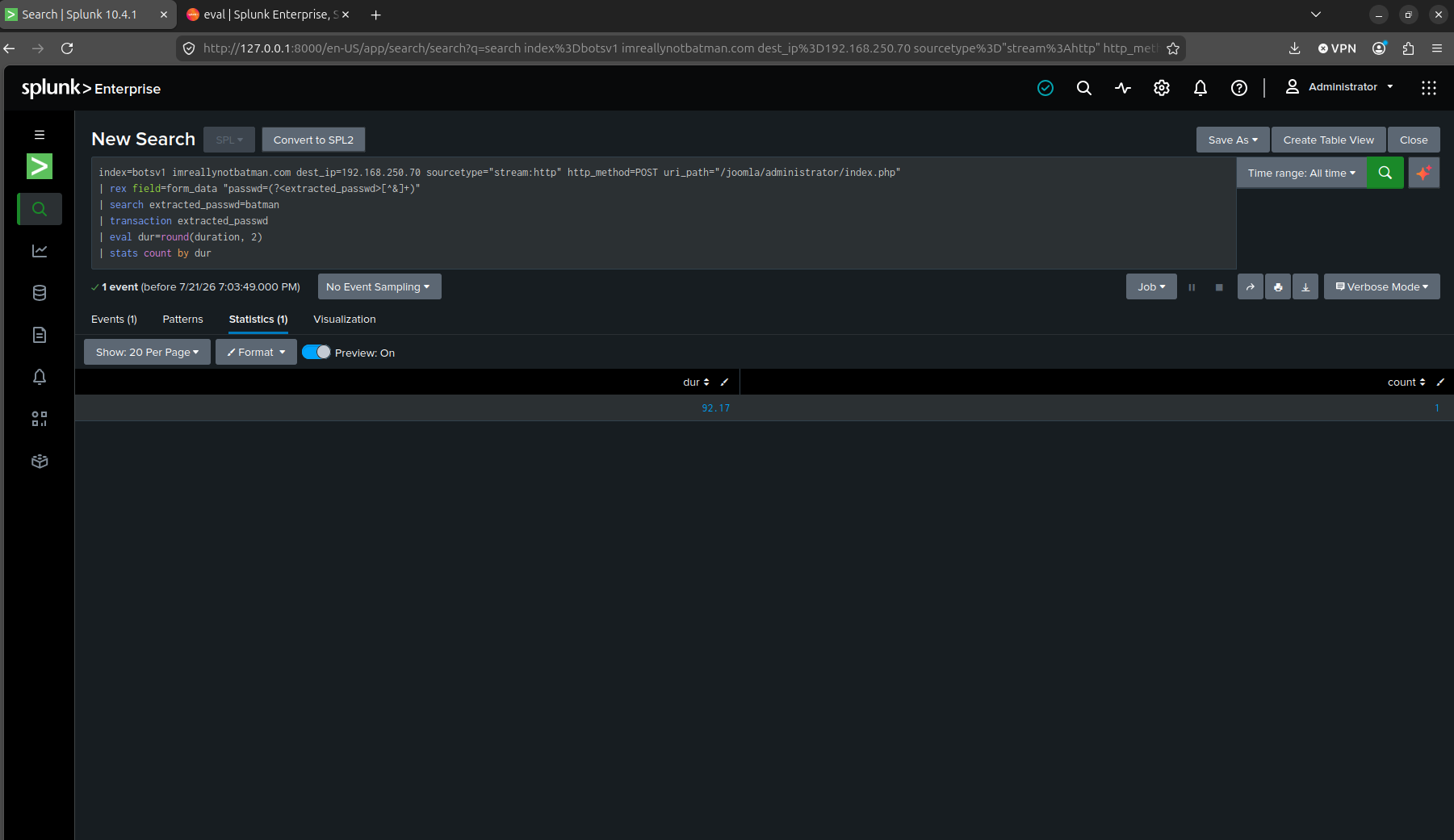
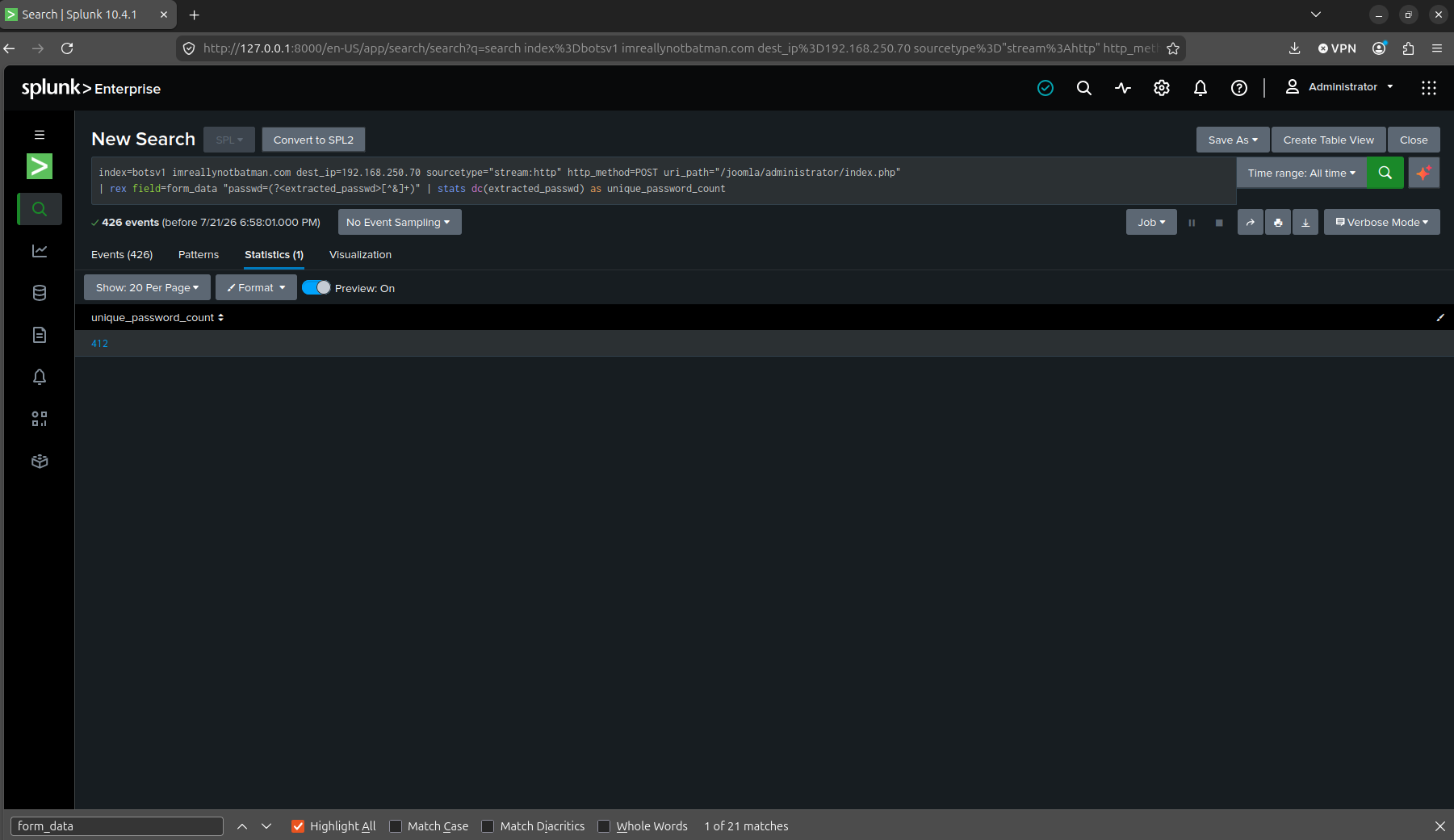
The last three questions were closer to statistics than investigation, and by this point the field extraction from Q13 made them fast. Average password length across all attempts was 6.17 characters with a standard deviation of 1.04, I wanted to find out the standard deviation to find out if it really was an average of 6.17. The gap between the correct guess and the compromised login was 92.17 seconds. And the brute force tried 412 unique passwords total, matching the event count from Q7.
What I actually took away
The biggest thing this scenario taught me is that a log rarely just hands you the answer to did this work. Q14 is the clearest case. The login event that succeeded looked identical to 411 that failed. The cookie showing up somewhere only an authenticated session could reach was what proved it. Thinking from a real event, you wouldn’t have an answer sheet you could verify your findings against which is the reason why it’s very important that you know how to validate your findings.
The Vhash and Imphash question stuck with me for a different reason too. I was investigating a 2016 breach with 2026 tooling, and the tools have changed underneath the dataset. In my opinion, both answers were correct as they both could do the same thing, they were just released at different times. Although in this case, Imphash would be right due to it being around the time the challenge came out while Vhash coming out a few years after.
Limits
A few honest gaps, since I’d rather list them than pretend this was clean start to finish. Q5 wasn’t independently confirmed the moment I found it. I noted it as “very likely” based on the Q4 event and only formally confirmed it in a separate pass. The spear-phishing question (Q10) is OSINT by necessity, not a Splunk finding, since the email itself was never indexed in this dataset. Worth remembering that not every question in a SIEM exercise is actually answerable from the SIEM.
Ethics note
BOTSv1 is Splunk’s own public training dataset, built specifically to be investigated this way. I wouldn’t point any of the actual attacker techniques described here (the scanning, the brute force, the webshell) at infrastructure I don’t have explicit permission to test.
The 17 questions, answered
| # | Question | Answer |
|---|---|---|
| 1 | What is the likely IPv4 address of someone from the Po1s0n1vy group scanning imreallynotbatman.com for web application vulnerabilities? | 40.80.148.42 |
| 2 | What company created the web vulnerability scanner used by Po1s0n1vy? | Acunetix |
| 3 | What content management system is imreallynotbatman.com likely using? | Joomla |
| 4 | What is the name of the file that defaced the imreallynotbatman.com website? | poisonivy-is-coming-for-you-batman.jpeg |
| 5 | What FQDN is associated with the dynamic DNS used in this attack? | prankglassinebracket.jumpingcrab.com |
| 6 | What IPv4 address has Po1s0n1vy tied to domains pre-staged to attack Wayne Enterprises? | 23.22.63.114 |
| 7 | What IPv4 address is likely attempting a brute force password attack? | 23.22.63.114 |
| 8 | What is the name of the executable uploaded by Po1s0n1vy? | 3791.exe |
| 9 | What is the MD5 hash of the executable uploaded? | AAE3F5A29935E6ABCC2C2754D12A9AF0 |
| 10 | What is the SHA256 hash of the spear-phishing malware? | 9709473ab351387aab9e816eff3910b9f28a7a70202e250ed46dba8f820f34a8 |
| 11 | What special hex code is associated with that malware? | 53 74 65 76 65 20 42 72 61 6e 74 27 73 20 42 65 61 72 64 20 69 73 20 61 20 70 6f 77 65 72 66 75 6c 20 74 68 69 6e 67 2e 20 46 69 6e 64 20 74 68 69 73 20 6d 65 73 73 61 67 65 20 61 6e 64 20 61 73 6b 20 68 69 6d 20 74 6f 20 62 75 79 20 79 6f 75 20 61 20 62 65 65 72 21 21 21 |
| 12 | What was the first brute force password used? | 12345678 |
| 13 | Which brute-forced password is James Brodsky’s favorite Coldplay song (six characters)? | yellow |
| 14 | What was the correct admin password? | batman |
| 15 | What was the average password length in the brute force attempt? | 6.17 characters (σ 1.04) |
| 16 | How many seconds elapsed between the correct guess and the compromised login? | 92.17 seconds |
| 17 | How many unique passwords were attempted? | 412 |
Sources
- Splunk’s announcement post: “Boss of the SOC Scoring Server, Questions and Answers, and Dataset! Open-Sourced and Ready for Download”
- CyberDefenders — Boss of the SOC v1
- [Question-Source] (https://github.com/Sean-Everett/Splunk-Boss_of_the_SOC_v1/blob/main/Scenarios/Scenario%201.md)
Part 2 covers the Cerber ransomware outbreak on we8105desk.